Features scheduled for release on 20/08/2026. The functionality detailed will not be available in the system until this date. However, please note that this is an ETA and may be subject to change.
Release Topics
- Extend Service Type Task Description Character Limit (4,000 → 8,000)
- Job Number Search Across 'Customer Grouped' & 'Batch' Invoice Screens
- Control Supplier Account Number field Requirement Across Purchasing
- Log Jobs & Quotes Against Associated Customers
- Inactivate Unused Job Types (Number Conventions)
- Manage Contacts - Filter Job Selection by Contact Assignment and Action
- Retain Asset Class & Service Type for Assets Added to a PPM Job via Mobile
- Mobile - Apply Selling Rate Uplift to Parts with a Zero Sell Price
- Contract Filtering on Group Customer Invoices
- Control Access to Staff Role Management
- Apply Global Discount Before or After VAT on Normal Quote
- Link Suppliers to Parts via the Parts Import Template (upto 5 per Part)
- Show Contract PO Invoices in All Purchase Invoices
- Add Engineer Name & Vehicle Registration in Customer Visit Notifications
- Supplier Invoice and Purchase Order API Improvements
- Add Multi-Currency Tags to Jobsheet Templates
- Target Attendance Date filter on All Jobs screen
- Filter Sites by Associated Customer When Logging Jobs and Quotes
Marketplace Enhancements
- Send Email Notifications for Imported Jobs
Project updates:
2. Project Invoice Approval Controls
3. Editing Project invoice dates
4. Project Variation Dashboard
5. Time & Materials Invoicing Improvements
6. Project Notes Improvements
7. Dashboard and Timeline exports
8. Project Budget and Variation Improvements
Release Details
1. Extend Service Type Task Description Character Limit (4,000 → 8,000)
- Service Type task descriptions can now contain up to 8,000 characters, allowing more detailed instructions to be stored against a task.
- This is particularly useful for detailed maintenance instructions, such as SFG20 tasks, where the full task description can now be entered without needing to split the content across multiple tasks.
- The increased character limit is available when adding or editing a Service Type under Settings > Library > Service Types.
Click here to find out more about setting up your service types.
.png)
2. Job Number Search Across 'Customer Grouped' & 'Batch' Invoice Screens
- Invoice screens can now be searched directly using a Job Number.
- The Search Jobs field on grouped invoices and batch invoicing now searches by Job Number, while the All Invoices screen can also find grouped invoices containing a specific job.
- Please note:
- The Job Number must be entered in full. Partial Job Number searches are not supported.
- No configuration is required.
.png)
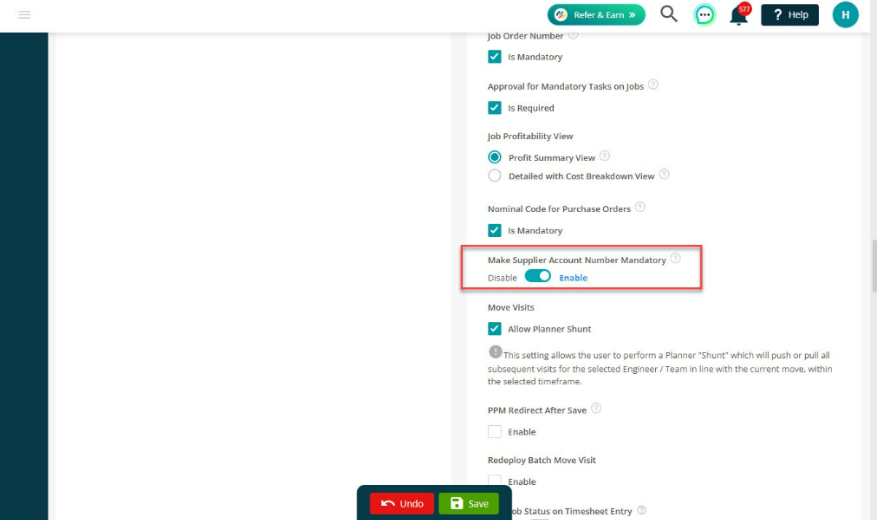
3. Control Supplier Account Number field Requirement Across Purchasing
- A new system setting allows administrators to make the Supplier Account Number mandatory across purchasing screens.
- Previously, the field was mandatory in some areas but optional elsewhere. This update provides a consistent approach across purchasing.
- Go to Settings > System Settings and enable Make Supplier Account Number Mandatory.
- When enabled:
- Supplier Account Number is required when creating or editing suppliers.
- Purchase orders cannot be saved without an account number.
- The same validation is applied to Sage 50 supplier imports.
- Hire orders are excluded from this requirement.
- The setting is disabled by default, so existing behaviour is unchanged unless it is enabled.
4. Log Jobs & Quotes Against Associated Customers
- Logging jobs and quotes is now more flexible for sites with associated customers.
- You can now select an associated customer when logging a job or quote, identify records that use an associated customer, and change the customer on an editable quote.
- When a site is selected, use Show Associated only above the Customer field. The Customer dropdown will then display only the customers associated with the selected site.
- Jobs
- Related Jobs
- Quotes
- Related Quotes
- Job Detail and Quote Detail now display an Associated label when the record has been logged against an associated customer rather than the site's main customer.
5. Inactivate Unused Job Types (Number Conventions)
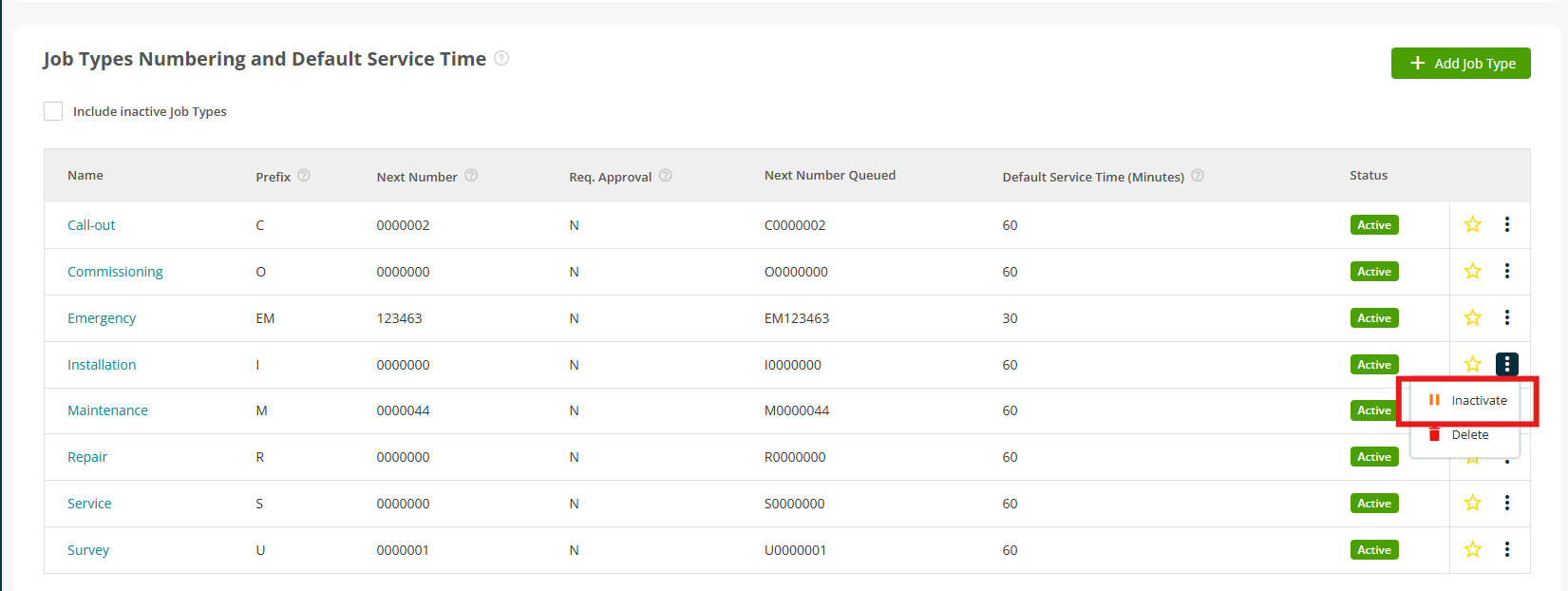
- Job Types can now be inactivated without deleting them.
- This provides a safer way to retire Job Types while preserving the history of existing jobs and quotes.
- From Settings > System Setup > Number Convention, use the row menu to:
- Inactivate an active Job Type
- Activate an inactive Job Type
- Inactivating a Job Type does not change existing jobs, quotes, numbering or prefixes.
- Historical records can still be searched, reported on and filtered using their original Job Type.
- Inactive Job Types no longer appear when creating new records.
- Recurring jobs, PPM schedules and API processes that reference an existing Job Type continue to use that stored Job Type.
Click here to read more about setting up your job types.
6. Manage Contacts - Filter Job Selection by Contact Assignment and Action
- The Manage Contacts sections against a Customer or Site now filter jobs according to the contacts selected and the action being performed.
- When removing contacts, only jobs where at least one selected contact is currently assigned are displayed.
- When assigning contacts, only jobs where at least one selected contact is not already assigned are displayed.
- This makes it easier to identify the jobs that will actually be affected by the selected action.
7. Retain Asset Class & Service Type for Assets Added to a PPM Job via Mobile
- When an engineer adds an existing Site Asset to a job using the mobile app, the asset's information is now retained correctly.
- The Job Asset now carries across:
- Asset Class
- Service Type
- Service Type checklist
- This means engineers can see the correct asset information and required tasks when working with existing assets.
- The improvement applies when adding or moving an existing Site Asset to a job or visit through the mobile app.
8. Mobile - Apply Selling Rate Uplift to Parts with a Zero Sell Price
- Parts added through the mobile app with a library sell price of £0 now receive the correct Material uplift when synchronised to Back Office.
- Previously, these parts could be synchronised with a £0 sell price and an incorrect uplift, potentially requiring manual invoice corrections.
- New mobile parts now follow the same uplift behaviour as parts added through Back Office.
- This applies to the Visit > Add Part process when the part is synchronised to Back Office.
- Existing part records are not recalculated retrospectively.
9. Contract Filtering on Group Customer Invoices
- Grouped customer invoice screens can now be filtered by Customer Contract.
- This makes it easier for finance teams to identify and invoice jobs belonging to a specific PPM contract without having to work through all of the customer's jobs.
- The grouped invoice screens now support:
- Filtering by one or more customer contracts
- Searching by PPM Contract Number
- Viewing contract-specific jobs and draft invoices
- This allows users to focus invoicing activity on the relevant contract rather than the customer's entire account.
Click here to read our guide on customer grouped invoicing.
10. Control Access to Staff Role Management
- New permissions provide more control over who can manage staff roles.
- Two permissions have been added to the Staff / User Management permission group:
- Manage Staff Roles
- Delete Staff Roles
- The two permissions are independent, allowing administrators to give users role-management access without allowing them to delete roles.
- Existing users who already have Staff View are automatically granted both permissions, so there is no immediate change to existing access.
Click here to read more about staff roles and setup.
.png)
11. Apply Global Discount Before or After VAT on Normal Quote
- Whole-quote discounts can now be applied either Before VAT or After VAT.
After VAT- This remains the default behaviour.
- The discount is deducted from the final total after VAT has been calculated.
Before VAT
- The discount is deducted from the price before VAT is calculated.
- This is useful when a discount needs to reduce the VAT-able amount without requiring each individual quote line to be discounted manually.
- When a quote contains multiple VAT rates, the discount is allocated across the relevant lines so that VAT is calculated correctly.
- The selected discount method is retained when the quote is converted into an invoice.
Click here to read more about logging quotes.
.png)
12. Link Suppliers to Parts via the Parts Import Template (upto 5 per Part)
- Suppliers can now be linked to parts directly through the Parts Import Template.
- Up to five suppliers can be associated with each part.
- This makes it easier to add or update supplier pricing across multiple parts without editing each part individually.
- The functionality is controlled by the Parts Import Template with linked Supplier setting under: Settings > System Setup
- Suppliers must already exist in Joblogic. The import will not create new supplier records.
- The import also validates supplier information, including inactive suppliers, duplicate suppliers and multiple default suppliers.
- If the Buy Stock Unit app is enabled, the relevant Buying Unit fields are also included in the template.
.png)
.png)
13. Show Contract PO Invoices in All Purchase Invoices
- A new Contract Purchase Invoices tab is available under: Purchasing > All Purchase Invoices
- The tab provides a dedicated view of invoices and credits raised against Contract Purchase Orders.
- The tab is view-only. Invoices continue to be created and managed from the relevant Contract Purchase Order.
.png)
14. Add Engineer Name & Vehicle Registration in Customer Visit Notifications
- Customer email and SMS notifications (settings > email notifications, or sms notifications) can now include the engineer's vehicle registration number.
- The new [VehicleRegistration] variable is available for:
- Engineer Travelling
- Visit Reminder
- Visit Deployed
- Engineer Arrived
- Add the variable to the relevant email or SMS template to include the engineer's vehicle registration.
- Nothing changes automatically for existing templates.
- If the engineer does not have a vehicle recorded, the variable will remain blank.
Click here to read more about setting up your email/sms notifications.
.png)
15. Supplier Invoice and Purchase Order API Improvements
- Supplier invoice lines can now be linked directly to their corresponding Purchase Order Lines through the API.
- When creating a supplier invoice through:
POST /api/v1/purchaseorder/addsupplierinvoice an optional purchaseOrderLineId can now be included against each invoice line. - The value is also returned when retrieving supplier invoice information through:
POST /api/v1/purchaseorder/getsupplierinvoicebypurchaseorderid
Important information
- The field is optional, so existing integrations continue to work without changes.
- The Purchase Order Line must belong to the same Purchase Order.
- The Purchase Order Line must be delivered or partially delivered.
- Invalid links will cause the request to be rejected.
- This is an API-only enhancement and does not introduce any changes to the Joblogic user interface.
- Linking an invoice line does not change invoice approval or matching behaviour.
- Invoices matched against a Goods Received Note will not contain the Purchase Order Line link.
16. Add Multi-Currency Tags to Jobsheet Templates
- Jobsheet templates can now display converted-currency values for multi-currency jobs.
- New merge tags allow converted values to be displayed for:
- Document totals
- Mileage
- Expenses
- Callout
- Subcontractor
- Schedule of Rates
- Other costs
- Individual cost lines
- Value-only versions are also available where a number without the currency symbol is required.
- The tags are available in the Multi-Currency group when editing Jobsheet Templates under Settings > Document Templates.
- Converted values are populated when multi-currency app is enabled and the job has a conversion rate and target currency.
Click here to more about jobsheets.
.png)
17. Target Attendance Date filter on All Jobs screen
- The Target Attendance Date is now available on the All Jobs screen, allowing users to view and filter jobs based on their expected attendance date.
- This makes it easier to monitor attendance commitments, support operational planning and track jobs against attendance-related KPIs.
- Head to Jobs > All Jobs and click Advanced Filters to view this filter.
.png)
18. Filter Sites by Associated Customer When Logging Jobs and Quotes
- When logging a job or quote, users can now filter the Site list to show only sites where the selected customer is an associated customer.
- A new Show Associated only option is available above the Site field when the selected customer has associated sites. This makes it easier to find the correct site when working with associated customers.
- The same filtering is available when logging related jobs or quotes.
.png)
Marketplace Details
1. Send Email Notifications for Imported Jobs
- Jobs created using the Job Import process can now trigger the same email notifications available when jobs are logged manually.
- A new Send Notifications column has been added to the import template. Set this to True for the relevant jobs to send the configured notifications.
- Supported notifications include:
- Job allocated
- Job completed
- Job cancelled
- Job invoiced
- Notifications are email-only and are disabled by default for imported jobs.
- Note: This functionality requires the Import Job Notifications Marketplace app to be enabled.
Click here to read more about this app.
.png)
.png)
Project updates
2. Project Invoice Approval Controls
- Administrators now have greater control over how backdated fixed-price project invoices are handled.
- A new setting is available under Settings > System Setup:
- Enable Auto-Approve Backdated Invoices
- When enabled, backdated fixed-price invoices can continue to be automatically approved.
- When disabled, backdated invoices remain in Draft until they have been reviewed and manually approved.
To read more about your project settings, click here.
.png)
3. Editing Project invoice dates
- Invoice dates can now be amended after approval for applicable project invoice schedules.
- When the invoice date is changed, the linked Payment Due Date is updated automatically.
- Job Variation invoice dates can also be edited directly before or after approval.
.png)
4. Project Variation Dashboard
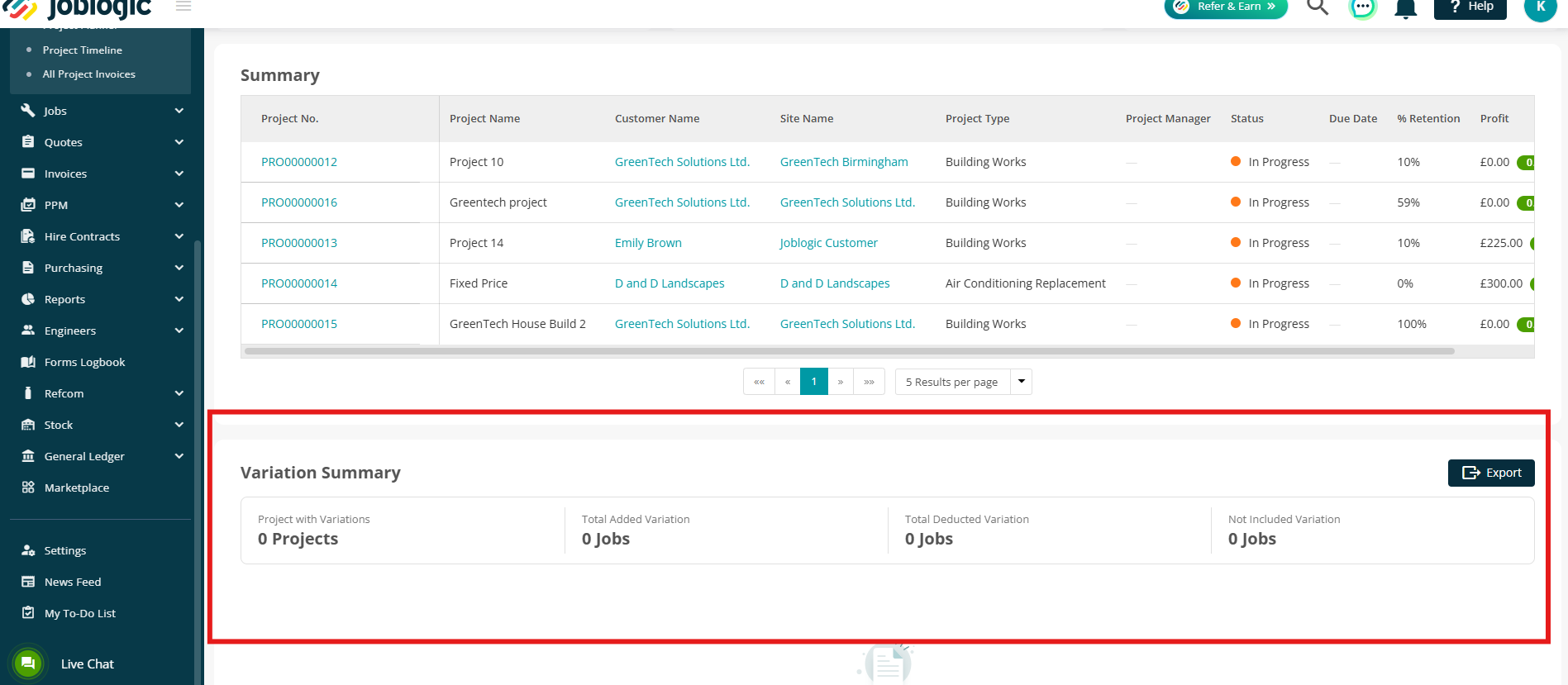
- The Projects Dashboard now provides a clearer summary of project variation activity and its financial impact.
- A new Variation Summary table displays:
- Total Value
- Original Value
- Manual Variation
- Added Variation
- Deducted Variation
- Number of Added variation jobs
- Number of Deducted variation jobs
- Number of Not Included variation jobs
- The Variation Summary can also be exported to CSV.
- The export respects the filters and sorting applied to the dashboard.
5. Time & Materials Invoicing Improvements
- Time & Materials invoicing has been updated with clearer terminology, improved calculations and additional visibility across Progressive and Cumulative Billing.
Updated terminology
- The following labels have been clarified:
- Cumulative Value → Invoiced Value
- Claim Value → Cumulative Claim Value or Current Claim Value
Improved remaining amount calculation
- A calculation issue affecting the Remaining Amount in Cumulative Billing has been corrected.
- The value now reflects the correct calculated amount when cost lines are unchecked.
Claim Summary columns
- A new Show Claim Summary columns option allows additional information to be displayed, including:
- Total Claim %
- Total Value
- Invoiced Value
- In Draft/Application
- Remaining to Invoice
- The option is disabled by default.
T&M document information
- Additional and corrected merge tags are available for Time & Materials documents, including information such as:
- Claim Percentage
- Labour Remaining to Invoice
- Previously Claimed
6. Project Notes Improvements
- Project information can now be carried through more consistently from projects and project quotes into the associated jobs and visits.
Project notes on jobs and visits
- Jobs belonging to a project now display a read-only Project notes group alongside the existing Customer, Site and Job notes.
- Visits under project jobs also display the Project notes.
- This creates a consistent notes hierarchy:
- Customer → Site → Project → Job → Visit
Project Quote notes
- Where a project has been created by upgrading a Project Quote, the original quote notes are retained on the Project Notes tab as a read-only Project Quote group.
- This ensures important information captured during the quoting process remains available after the project is created.
.png)
7. Dashboard and Timeline exports
- The Projects Dashboard can now be exported to PDF or Excel.
- PDF exports allow users to select the dashboard sections to include, while Excel exports include the KPI Summary and Project Summary.
- The Project Timeline (Gantt) can also be exported to PDF or Excel.
- PDF exports use the Month view, while Excel exports include the full dataset.
- Applied filters are retained when exporting.
- Export activity is recorded in the audit history and requires the appropriate permission.
.png)
8. Project Budget and Variation Improvements
Several improvements have been made to project budgets and variation handling.
Job Costs budget display
- The Job Costs screen now displays the budget for the selected job or section rather than the combined budget for the entire project.
- This ensures the displayed budget matches the relevant section and the Profitability panel.
- The change applies to projects created from multi-section project quotes.
Project Quote jobs and variations
- Jobs automatically created when a Project Quote is upgraded are no longer presented as candidates for project variations.
- The Mark as Variation Job option is also removed from Job Details for these jobs.
- This applies to both Fixed Price and Time & Materials projects.
- Existing variation records are unaffected.
.png)
Bug Fixes
- Core Platform & Permissions
- Fixed duplicate permission entries for Clik product customers and prevented accidental permission removal when modules are removed.
- Added self-healing for Customer Portal role updates that become stuck in progress.
- Fixed visibility issues affecting holiday statuses in the Customer Portal.
- Resolved issues preventing new users from activating their accounts through email.
- Fixed configuration issues with Customer Portal role settings.
- Improved overall Customer Portal stability.
- Updated notification contact handling for the Lone Worker Marketplace app.
- Fixed deployment issues affecting Assisted Forms.
- Deleted primary contacts are now correctly removed from Customer and Site detail pages.
- Prevented duplicate forms from being created during Assisted Form Deployment.
- Projects & Financial Management
- Fixed project invoices incorrectly including cost lines that had already been invoiced on related jobs.
- Fixed Fixed Price invoice schedules so they correctly upgrade to Invoiced on the selected date.
- Prevented invoices containing lines from suspended PPM contracts from being approved.
- Fixed carriage charge conversion issues on multi-currency Purchase Orders.
- Resolved zero-value job and duplicate charge issues affecting consolidated invoices.
- Fixed issues preventing callout rates from being applied correctly.
- Corrected PPM summary views where contract values were displayed as zero.
- Corrected Line Lease transaction generation.
- Fixed Order Number and Reference Number population when upgrading Hire Contracts from quotes.
- Resolved silent annual GoCardless renewal failures.
- Fixed filtering and export issues affecting Purchase Orders.
- Fixed export issues affecting Subcontractor Purchase Orders.
- Mobile & Field Service
- Resolved fatal Android 15 crashes related to data synchronisation service timeouts.
- Enabled mobile access to document links attached to assets.
- Corrected asset service date logic so the most recently completed job date is displayed.
- Fixed issues preventing assets from being completed on mobile.
- Improved access to mobile forms when Wi-Fi is unavailable.
- Resolved rendering and data-entry issues affecting custom mobile forms.
- Improved overall mobile application stability.
- Fixed issues where engineers were not prompted to complete required forms.
- Resolved errors preventing mobile forms from being finalised.
- Improved data synchronisation reliability for field engineers.
- Integrations
- Fixed a one-day date shift during Sage 50 synchronisation caused by timezone handling.
- Added support for Sage 50 v34.
- Updated the AXA Contractor API to provide parity with relevant web functionality.
- Fixed specific invoice synchronisation errors affecting Sage 50.
- Improved general Sage 50 integration reliability.
- Planner & Job Management
- Fixed service time recalculation when templates are applied after selecting a customer.
- Added Job Reference 2 visibility to the Planner edit modal.
- Resolved errors when selecting fault codes in the Planner.
- Fixed issues preventing job costs from being pulled through correctly.
- Updated and corrected Visit Reason logic.
- Resolved issues affecting the visibility and saving of Job Notes.
- Added new webhooks for Asset PPM events.
- Completed improvements relating to form deployment auditing.
- Cleaned up access and logic relating to revisit reasons.
- Fixed rendering issues affecting DocX-based jobsheets.
- Resolved general issues with Parts Management.
- Fixed unexpected job status change notifications generated through the API.
- Resolved mileage calculation and tracking issues.
- Ensured specific part tax rates correctly override system defaults.
- Fixed email management issues relating to supplier invoices.
- Prevented reminder emails from being sent for suspended subcontractors.
- Completed auditing improvements for Subcontractor Purchase Orders.
- Resolved attachment-related issues affecting Call Requests.
- Fixed issues where revisit prompts could prevent job sign-off.
- Resolved Friday schedule export generation failures.
- Prevented jobs from being imported against suspended sites.