Features scheduled for release on 23/07/2026. The functionality detailed will not be available in the system until this date. However, please note that this is an ETA and may be subject to change.
Release Topics
- Improved SOR management for subcontractors
- Improved area filtering for historical records
- Carry forward approval settings during PPM renewal
- Add manual lines to draft PPM invoices
- Improved nominal code selection for batch invoices
- Automatically attach jobsheets to invoice emails
- Engineer-level Vehicle Checklist controls
- Improved PPM navigation after save
Marketplace Enhancements
- Bulk PPM Renewal – Renew completed contracts
- Price List
- Temporary Sites
- Smart Form Deployment
- Bulk Job Update
- Multi Depot
- SFG20 enhancements
Release Details
1. Improved SOR management for subcontractors
We have introduced new controls for managing subcontractor SOR (Schedule of Rates) items, giving teams greater visibility and control over costs submitted by subcontractors.
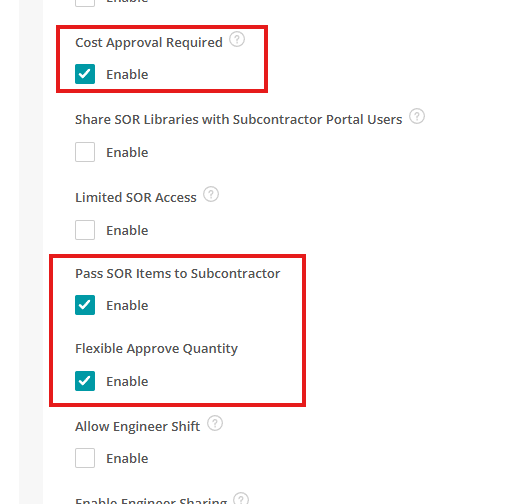
Access to this functionality is managed through Settings > System Setup and Settings > Staff for user permission. These settings are disabled by default and require an existing Subcontractor Link between companies.
Pass SOR Items to Subcontractor
- When enabled, the SOR Items tab is available on subcontractor allocations, allowing users to pass selected SOR items to the subcontractor.
- SOR items can also be passed automatically when allocating a subcontractor to a job that already contains SOR items.
- When items are passed:
- Your Cost becomes the subcontractor’s Sell price
- The subcontractor’s Cost starts at zero
- Your own Sell price is not shared with the subcontractor
- Note: Once SOR items have been passed to a subcontractor, this action cannot currently be undone.
Cost Approval Required
- When enabled, the Cost(s) tab is available on subcontractor allocations, allowing users to review costs submitted by the subcontractor.
- Users can:
- Approve or reject individual SOR lines
- Provide a rejection reason
- Mark items as Review Required
- Approved costs are added directly to Job Cost, with the relevant selling-rate uplift applied.
- Approved subcontractor costs are grouped under Schedule of Rates in Job Cost.
Flexible Approve Quantity
- When enabled, approvers can approve or reject quantities that differ from the quantity originally claimed by the subcontractor.
- When disabled, approval quantities must match the quantities submitted by the subcontractor.
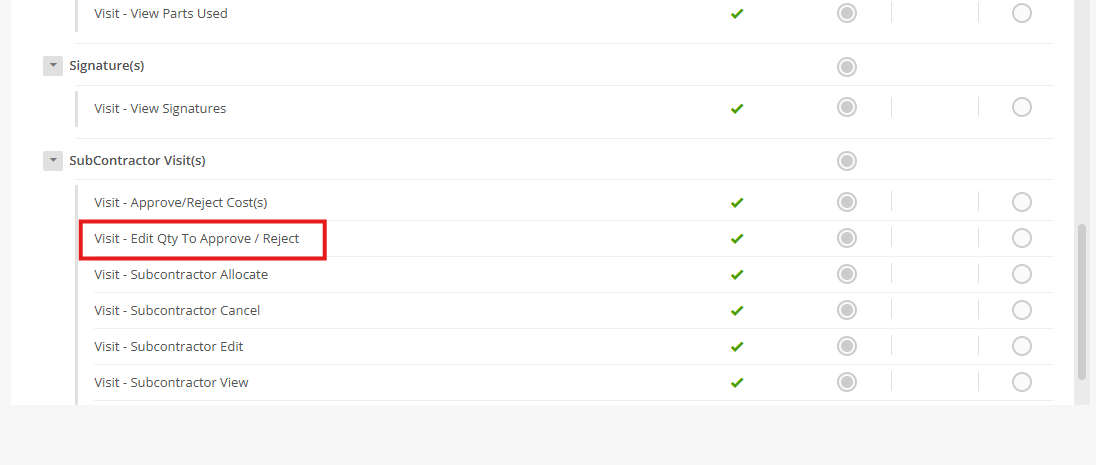
Visit - Edit Qty to Approve / Reject permission
- This permission controls who can edit the Qty to Approve and Qty to Reject fields when reviewing subcontractor costs.
- When enabled, users with this permission can amend quantities before approving or rejecting SOR lines.
- When disabled, these fields are read-only.
2. Improved area filtering for historical records
- Deleted Areas are now retained within filters, making it easier to locate historical records that were previously assigned to them.
- Previously, deleting an Area removed it completely from the available filter options, making it difficult to find Jobs, Sites and Quotes associated with that Area. Deleted Areas are now preserved for filtering purposes, ensuring historical records remain searchable.
- Deleted Areas continue to appear in the Area filters across Jobs, Sites, Quotes and the Planner. They are displayed in red with a tooltip indicating that the Area has been deleted from the library but is still available for filtering historical records.
- This improvement helps maintain reporting accuracy and ensures historical information remains accessible, even after an Area has been retired.
.png)
3. Carry forward approval settings during PPM renewal
- A new setting allows the Requires Approval option to be retained when renewing PPM contracts.
- This setting is now available under Settings > System Setup to carry this value forward automatically.
- When enabled, each renewed visit retains the Requires Approval setting from the corresponding visit on the original contract. Visits containing mandatory assets or tasks will continue to require approval, as they do today.
- This helps maintain consistent approval workflows across contract renewals while reducing manual administration.
.png)
4. Add manual lines to draft PPM invoices
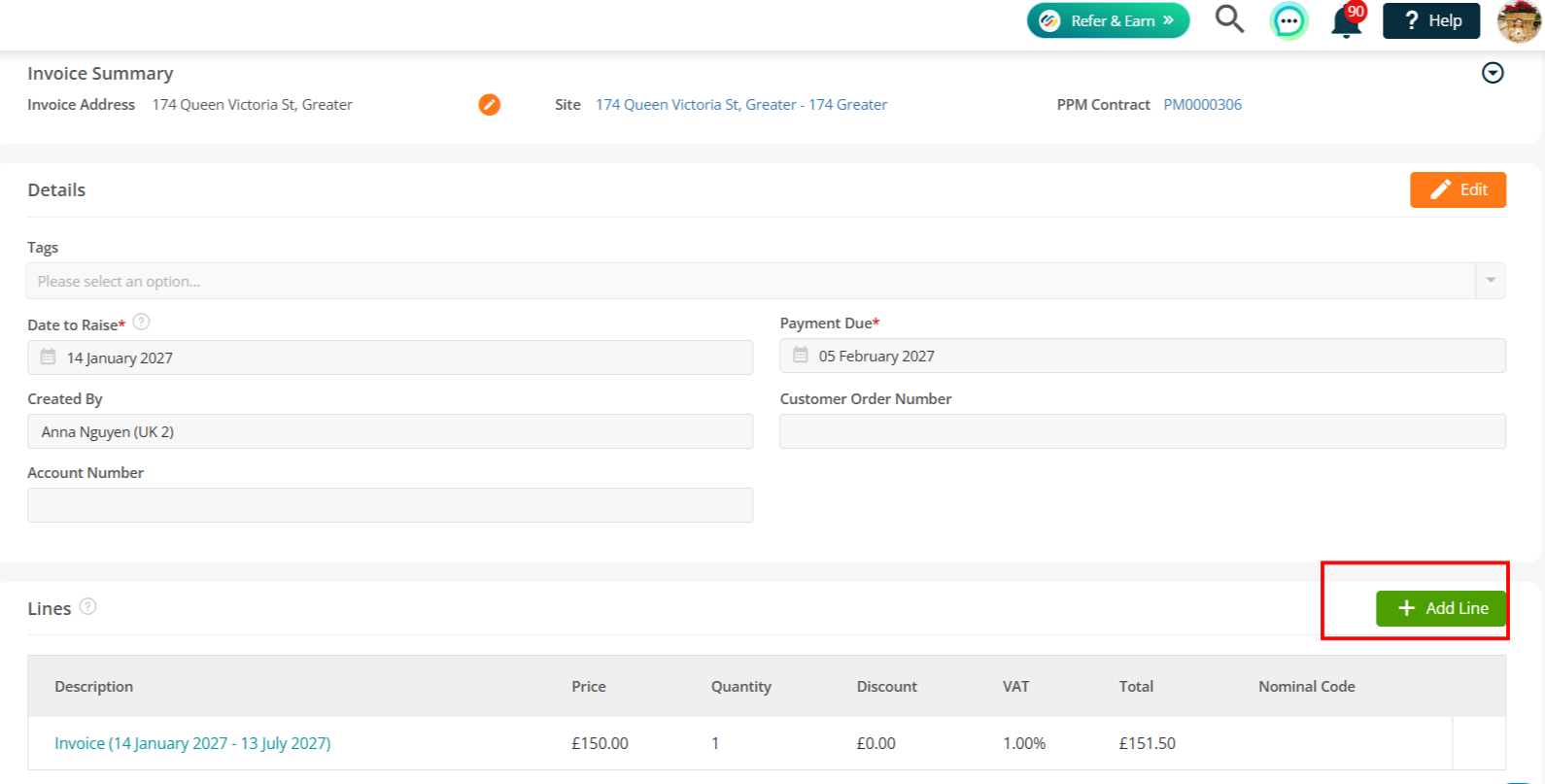
- Draft PPM invoices can now be updated with additional invoice lines before approval, bringing them in line with standard reactive invoices.
- Previously, Draft PPM invoices generated from contracts with a Billing Type of Invoice had a read-only Lines panel, preventing users from adding ad-hoc charges, parts, or adjustments.
- A new PPM Contract Invoice – Add Invoice Lines permission controls access to this functionality. Administrator users have this enabled by default, while all other roles (including custom roles) have it disabled by default.
- Users with the required permission can add, edit, and remove manual lines on Draft (non-frozen) PPM invoices. These additional lines are also included when creating credit invoices.
- This improvement gives finance teams greater flexibility when reviewing and adjusting PPM invoices, while keeping contract-generated billing lines protected.
.png)
5. Improved nominal code selection for batch invoices
- Batch-created invoices now assign Nominal Codes using the same hierarchy as invoices created individually from a Job.
- Previously, invoice lines created through Invoices > Create Batch of Invoices only checked the system-level Nominal Code settings, meaning codes could be left blank when no default was configured.
- Nominal Codes are now assigned using the following hierarchy: Site → Customer → Settings > Financials (System Setup).
- Where an invoice line is linked to a Subcontractor with a configured Nominal Code, the Subcontractor setting takes priority before falling back to the system configuration.
- This improvement ensures more accurate and consistent financial coding across both single and batch invoice creation, reducing the need for manual corrections.
6. Automatically attach jobsheets to invoice emails
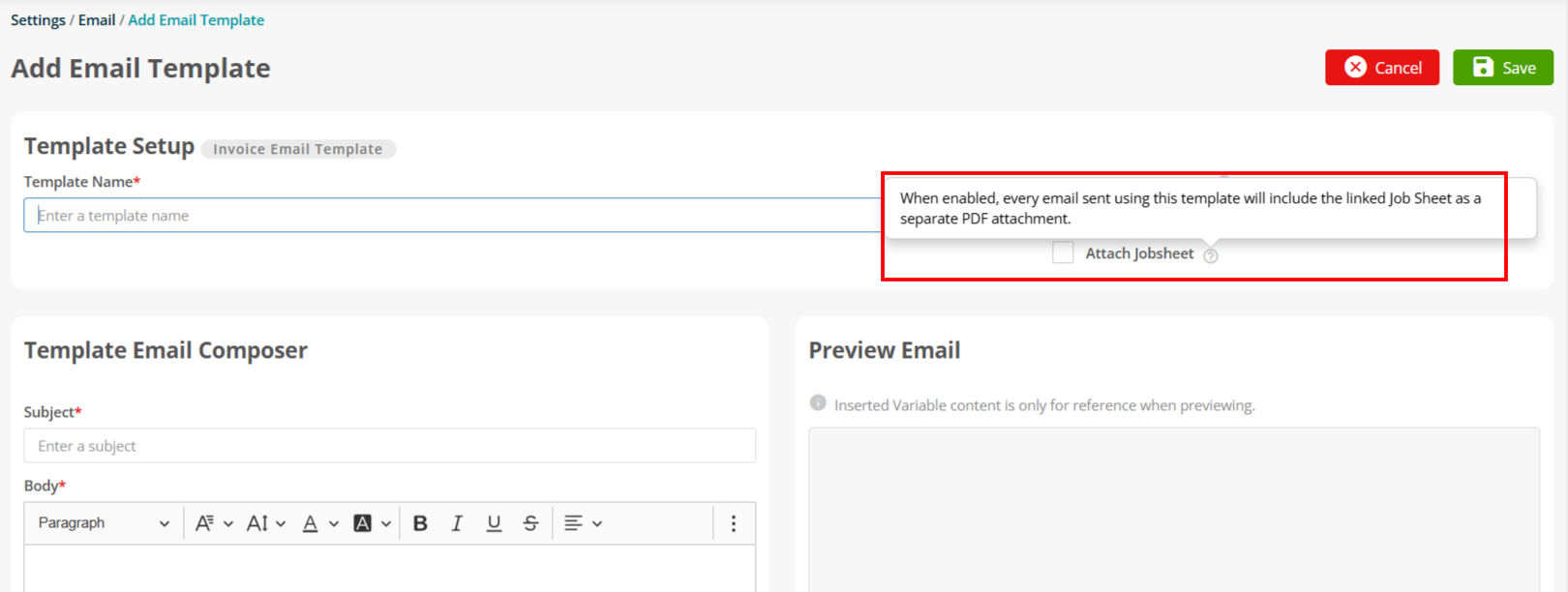
- Finance teams can now automatically include Jobsheets when sending invoice emails, helping provide customers with supporting documentation alongside their invoices.
- A new Attach Jobsheet option is available under Settings > Email > Invoice Template and is disabled by default. When enabled, the setting is automatically applied when that template is used to email invoices.
- You can also select Attach Jobsheet directly from the Email Invoice window (Invoice Details > Share > Email) before sending.
- When selected, the Jobsheet is attached as a separate file alongside the invoice. The required Jobsheet template is automatically selected based on the existing hierarchy (Site → Customer → System) but can be changed before sending.
- This functionality is supported for Standard, Schedule of Rates, Credit, and Customer Grouped invoices and is recorded within the outbound email audit trail. PPM Contract invoices and credits are not included in this update.
- This helps streamline invoice communication by ensuring customers receive the relevant job documentation at the same time as their invoice, reducing manual attachment of supporting files.
.png)
7. Engineer-level Vehicle Checklist controls
- Engineers who do not use a company vehicle can now be excluded from receiving the standard Vehicle Checklist (TVC) on their mobile app.
- A new Engineer does not have a company vehicle option is available on the Engineer Detail tab when creating or editing an engineer.
- When enabled, the engineer will no longer receive the daily or weekly TVC form. When disabled, the engineer will continue to receive the checklist as normal.
- This setting only affects the standard TVC. Job forms, general forms, and bespoke vehicle checklists continue to work as before.
- This improvement ensures vehicle checks are only assigned to relevant engineers, reducing unnecessary forms while helping teams maintain accurate compliance processes.
.png)
8. Improved PPM navigation after save
- Creating a PPM Contract now takes you directly to the record you have just created, matching the existing behaviour when creating PPM Quotes.
- The existing PPM Contract Redirect setting has been renamed to PPM Redirect After Save and now controls navigation after creating, renewing, or upgrading PPM records.
- When enabled, users are taken directly to the newly created or updated record. When disabled, users are returned to the relevant list view.
- This setting applies across all PPM entry points, including Add PPM, Add Asset PPM, Add Maintenance Contract, as well as contract renewals and upgrades.
- This provides a more consistent PPM workflow, reducing unnecessary navigation and helping you quickly access the contracts, quotes, and updates they have just created.
.png)
Marketplace Enhancements
The following updates relate to apps available through the Joblogic Marketplace and are applicable to customers subscribed to the relevant app.
1. Bulk PPM Renewal – Renew completed contracts
- We've made a small but impactful update to the Bulk PPM Renewal app.
- We've enhanced the Bulk PPM Renewal app to make renewing contracts even easier.
- You can now view and renew both Completed and In Progress PPM contracts from within the app, giving you greater visibility of contracts that have reached the end of their term.
- New status tabs allow you to quickly switch between contract statuses, making it easier to locate and renew the contracts you need without leaving the Bulk PPM Renewal screen.
To read more about this app, click here.
.png)
2. Price List
- The Price List app is now available as a standalone Marketplace app, making it easier for businesses to subscribe and manage pricing without requiring the Whale Tanker app.
- Existing Whale Tanker customers will be automatically subscribed, ensuring there is no disruption to their existing pricing configuration.
- Addition to becoming a standalone app, several improvements have been introduced to provide greater visibility and control over pricing.
Audit history
- A comprehensive audit trail is now available for Price Lists, recording changes made to Price Lists, Exceptions, Tiers, and Selling Rate associations.
- This provides greater traceability for pricing changes and supports auditing and troubleshooting.
Role-based permissions
New role permissions have been added, allowing administrators to control who can View, Create, Edit and Delete Price Lists.
Automatic subscription for existing customers
- Customers already using the Whale Tanker app will automatically receive access to the standalone Price List app as part of this release.
- No action is required, and all existing pricing will continue to work exactly as before.
To read more about this app, click here.
3. Temporary Sites
- The Temporary Sites app makes it easier to manage short-term and one-off work locations in Joblogic.
- Temporary work locations are now handled separately from your permanent Site records, helping keep your Site database organised and reducing unnecessary Site creation.
- You can continue creating jobs using the same familiar process, while Joblogic manages the temporary work location automatically in the background.
To read more about this app, click here.
.png)
.png)
4. Smart Form Deployment
- Next up is the new Smart Form Deployment app, providing a faster and more efficient way to deploy and manage electronic forms across your jobs.
- Deploy or undeploy multiple forms at once, configure how each form behaves, and control exactly which jobs each form is applied to, reducing manual administration and ensuring forms are deployed consistently.
- Choose whether to deploy forms to future jobs, existing incomplete jobs, or a manually selected group of jobs, giving you greater flexibility over how forms are rolled out.
- Configure deployment settings for individual forms or apply changes in bulk, making it easier to manage large numbers of forms across your workforce.
To read more about this app, click here.
.png)
5. Bulk Job Update
- We've introduced the new Bulk Job Update app, allowing you to update multiple jobs at once using a simple Excel template.
- Export a filtered list of up to 100 jobs, make your changes offline, then upload the completed template to apply updates in bulk, saving time and reducing manual administration.
- Only fields containing new or amended values are updated, helping to prevent existing data from being overwritten unnecessarily.
- This is ideal for high-volume administrative tasks, such as updating customer order numbers, rescheduling jobs, or making changes across multiple contracts, improving efficiency while reducing the risk of manual errors.
To read more about this app, click here.
.png)
.png)
6. Multi Depot
- The new Multi Depot app allows organisations with multiple locations to control access to Joblogic records by depot.
- Assign users a default depot and additional depot permissions, ensuring they only see and manage customers, sites, jobs, stock and financial records relevant to their area of the business.
- Configure depot settings across Joblogic Web, Mobile apps and Direct Sales Marketplace, helping multi-location businesses maintain separation of records while continuing to operate from a single Joblogic account.
- Manage depot and store associations, apply depot filtering rules, and control user access through flexible permissions, giving administrators greater visibility and control over how data is accessed.
To read more about this app, click here
.png)
.png)
7. SFG20 enhancements
- The SFG20 integration now supports automatic assignment of synced Service Types to Joblogic assets when schedules have been linked using the SFG20 Mobiliser tool.
- A confirmation prompt allows you to assign the Service Types to matched assets or continue with a library-only synchronisation if preferred.
- The Sync Audit has also been enhanced with new statuses to clearly show whether schedules were linked to assets, synced to the library only, or skipped by the user.
To read more about this app, click here.
.png)
.png)
Bug Fixes
Jobs, Planner & scheduling
- Fixed an issue where marking a visit as No Access from the back office before going On-Site could store a negative visit duration; a safeguard now prevents an end time earlier than the start time.
- Resolved a range of planner and scheduling issues, including the Route Scheduler not working, the Planner not showing full details or refreshing, the planner view for subcontractors, bulk travel-time calculation with Engineer Shift enabled, the Target Attendance Date default state, and training (non-productive) time appearing on engineers' schedules.
- Fixed several job and job-listing issues, including Completed Today not including Revisit Required jobs, jobs missing from search, the All-Jobs export not showing the edited Job Ref, the Quick filter Apply button, searching by Subcontractor Cost Approval Status, a recurring job issue, Job panel performance.
- Fixed issues where jobs at a higher status were changed to Completed when the Lock setting is on and confirmation is off, and where the Job Spend Limit value was not saved when the permission was denied.
Invoicing & billing
- Resolved several invoicing issues, including the attachment date showing on invoices, a customer change not reflected on a draft invoice, the Add Invoice button moving, a project invoice template issue, and an outbound email issue.
- Fixed SOR invoice issues, including missing Discount in the Import Costs modal, missing Uplift/Discount on invoices, incorrect Discount/Uplift when Sell Per Unit is 0, and an SOR item that could not be opened to mark as complete.
PPM & contracts
- Resolved PPM contract issues, including contract duplication, the All PPM export, the Total Contract Value not updating on fixed-price contracts, and end/start date behaviour on Asset PPM quotes and contracts.
- Fixed issues when working with contract assets, including adding the wrong item to a PPM quote/contract, deleting assets from a contract, the Add Assets popup listing all customers, a missing quote-guideline key, and a 'Permission denied' message on Renew Contract; also added a multi-day weekly clone option for PPM visits.
Quotes
- Resolved quote issues, including replica quotes, a quote approval not reflected correctly, the Projects quote module, and a quoted-value issue during job import.
Assets, stock & forms
- Fixed asset and stock issues, including adding assets from a spreadsheet, stocked unit configuration, an equipment import failure caused by special characters, adding asset images via the API, and incorrect asset details appearing on filled forms.
Reporting & dashboards
- Resolved reporting issues, including reports from another account showing, a Profitability report received after subscription cancellation, the Dynamic Dashboard refresh button, and a Dynamic Dashboard error.
Customers, users & permissions
-
Fixed customer and attribute issues, including a reported data issue on jobs, creating a custom attribute, attribute-filtered data not bulk deleting, adding contacts to jobs, and customer portal edit-site permissions.
-
Fixed user and access issues, including deactivated users showing as pending activation, being unable to create a user, a white box around selected items, and a security issue where a user without Staff Advanced Edit permission could edit role permissions.
Subcontractors
- Resolved subcontractor issues, including subcontractor purchase orders and subcontractor reminders.
Integrations & API
- Resolved integration and API issues, including Sage 50 sync and Sage customer update, the selling rates API, API field confirmation, a new Non-Productive Time API endpoint, an API error when assigning a form to a job, and Joblogic Chat / instant messaging.