Features scheduled for release on 25/06/2026. The functionality detailed will not be available in the system until this date. However, please note that this is an ETA and may be subject to change.
Release Topics
- Extended Audit History Retention
- Timesheet & job completion controls
- Target Attendance Date visibility & filtering
- Visit locking & route scheduling improvements
- Service job letter improvements
Marketplace Enhancements
- Equipment Hire improvements
- Project Management Enhancements
- Asset-Based PPM enhancements
- Microsoft 365 integration improvements
- Supplier & hire asset attributes
- Advance Reporting
- Accounts integration support for Hire and Project invoices
- Bill of Materials
- Dynamic Scheduler enhancements
Release Details
1. Extended Audit History Retention
- Audit history retention has been extended from 6 months to 24 months.
- Previously, audit records older than 6 months were automatically removed from the system. Now, the audit records will be retained for up to 24 months before being deleted.
- This provides a longer history of system activity and changes, supporting improved auditing, reporting, troubleshooting, and compliance requirements.
2. Timesheet & job completion controls
- Next up, there are a couple of new settings available to give you greater control over job status updates.
- Navigate to Settings > System Setup to configure them.
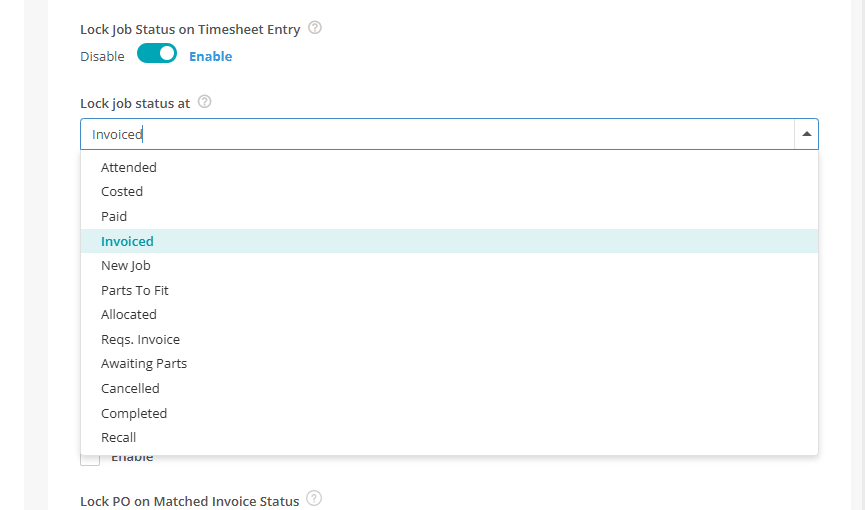
Lock Job Status on Timesheet Entry
- This setting allows you to protect a specific job status from being changed by timesheet activity.
- When enabled, select the job status you want to lock. Once a job reaches this status, any future timesheet entries will no longer update the job's status. Only one status can be selected at a time.
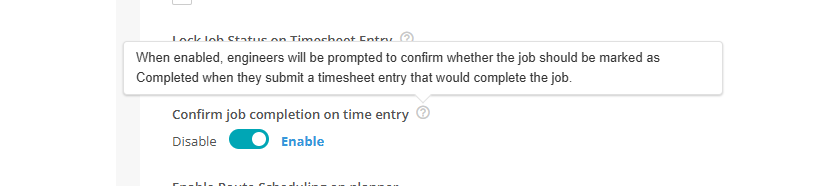
Confirm job completion on time entry
- A new setting allows engineers to confirm whether a job should be marked as Completed when submitting a timesheet entry. The confirmation is only shown when all visits have been completed, helping to prevent multi-visit jobs from being closed too early.
Add Time search improvement
- And finally, the Add Time job search in the Engineer Timesheet no longer hides jobs logged more than 90 days ago, so all valid open jobs now appear in the search.
3. Target Attendance Date visibility & filtering
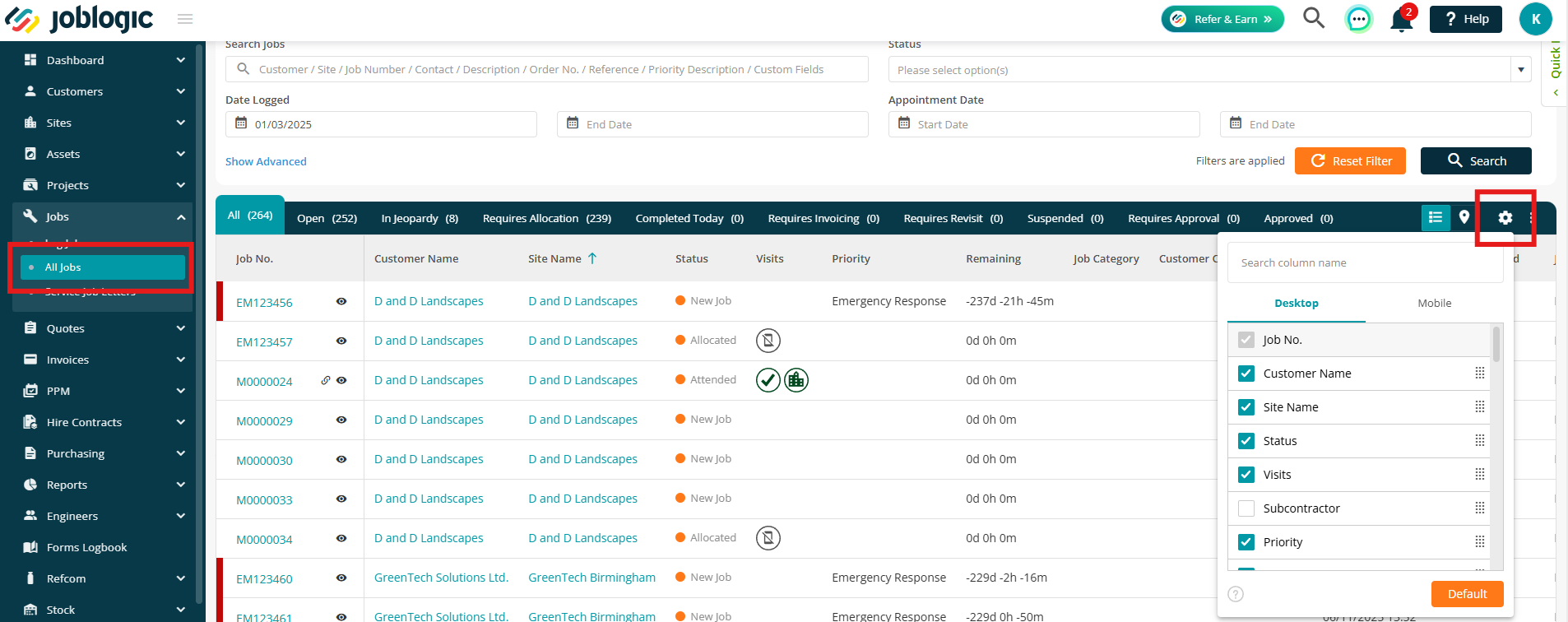
- A new Target Attendance Date column has been added to the All Jobs screen, allowing you to sort jobs directly by target attendance date using the column header.
- A Target Attendance Date range filter is also available in the Advanced Filters panel. This can be used alongside other search criteria and behaves consistently with existing date-based filters.
- The field is included in back-office reporting and grid exports. By default, the column is hidden and can be enabled through the grid configuration settings.
4. Visit locking & route scheduling improvements
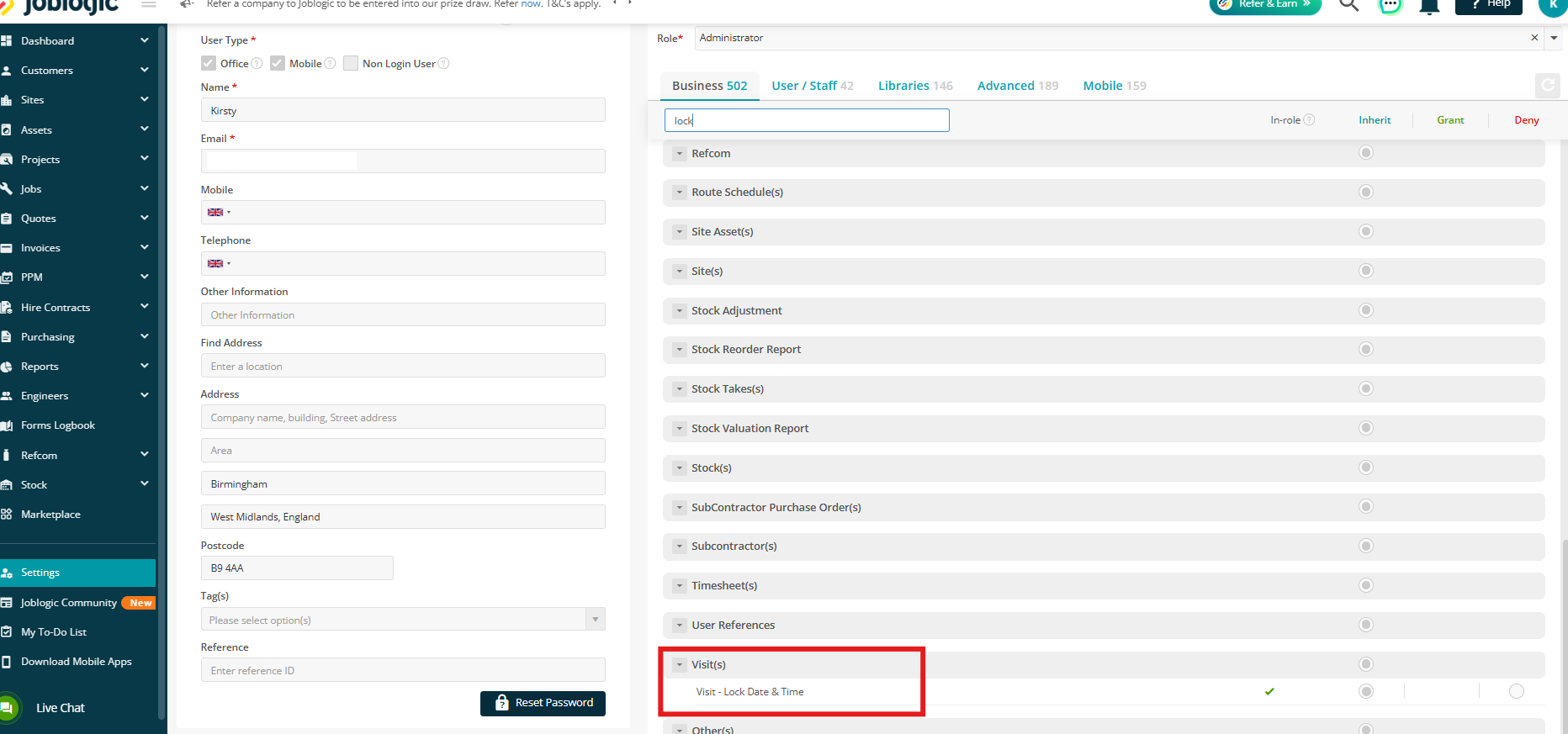
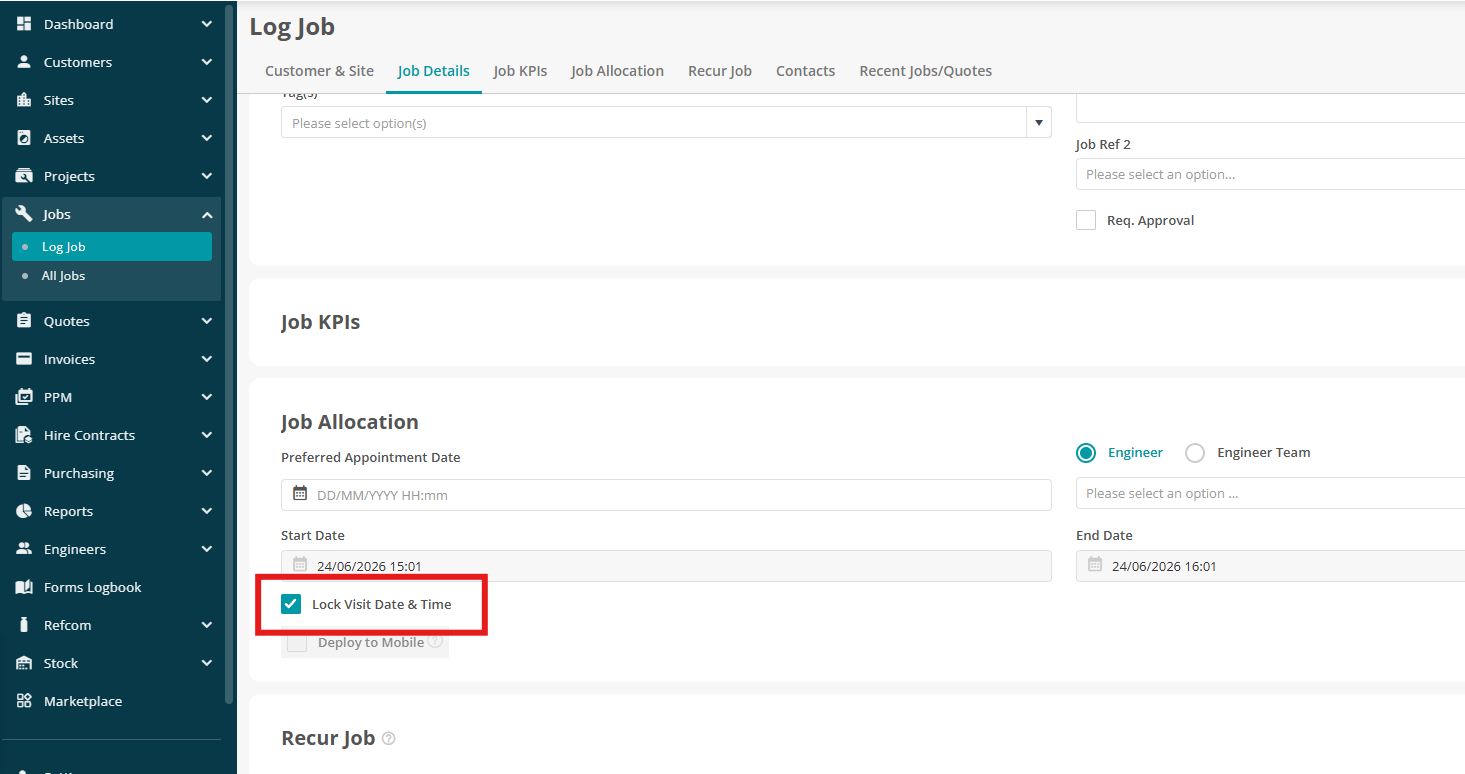
- A new permission allows users to lock the date and time on a visit. This ensures confirmed visit schedules remain fixed when route scheduling is run.
- The lock option is available on both the Log Job screen and the Visit screens.
- Route optimisation will retain locked visits at their original scheduled times, while optimising all remaining visits around them. This applies across both the Planner and Route Scheduler.
- When an optimised visit is moved to a different engineer or date, any previously allocated travel time is automatically removed from the original schedule. This prevents travel time from being duplicated.
5. Service job letter improvements
Letter content locked on first print or email
- Service Job letters now capture a snapshot of their content the first time they are printed or emailed. Any subsequent re-print or re-email will reuse this snapshot rather than regenerating content from the latest job data.
- This ensures issued letters remain consistent, even if job details (such as customer name, site name, or appointment date) change after the letter has been sent. This behaviour also applies to previously printed letters.
Recalculating letter and visit dates
- When the last service job completed date is updated, Joblogic recalculates the related service letter and scheduled visit dates. A confirmation step is shown before these changes are applied.
- Any already deployed visits are rescheduled to reflect the updated dates. Where letters have already been printed or emailed, the print/email status is refreshed so they can be reissued using the updated calculations.
- The system audit log is also expanded to record every recalculated date, providing a full history of changes.
Marketplace Enhancements
The following updates relate to apps available through the Joblogic Marketplace and are applicable to customers subscribed to the relevant app.
1. Equipment Hire improvements
Bulk import Hire Assets
- You can now import hire assets in bulk using a structured template, eliminating the need to add assets individually.
- A new Import Hire Assets option on the Hire Assets list allows you to download a template, upload your completed file, and create up to 1,000 assets in a single import.
.jpg)
Hire Asset Audit history
- The Audit tab on hire assets now records the full lifecycle of each asset, including creation, bulk import, edits, hire-status changes, depreciation updates, and suspension or reactivation events.
- Each entry records the action performed, the date and time, the user responsible, and a detailed change history, providing complete traceability for compliance, auditing, and troubleshooting.
Hire dashboard
- A new Hire Dashboard within the Advanced Hire module provides a centralised, real-time view of operational and financial performance, with interactive charts, summary cards and filters across contracts, assets, customers and time periods.
- Some summary cards and charts provide a detailed breakdown of the data behind each KPI, allowing you to navigate directly to the related contracts and quotes for faster analysis and more informed decision-making.
(4).png)
Check out the Hire guide to learn more about this app.
2. Project Management Enhancements
A number of new settings have been introduced to improve project financial tracking and visibility.
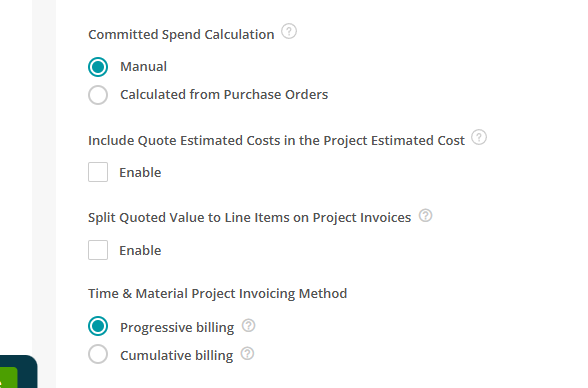
Committed Spend Calculation
- When enabled, Purchase Order values are automatically added to a project’s committed cost as soon as a PO is raised or linked to a project job.
- This provides earlier visibility of committed spend, without waiting for PO receipt or completion.
Include Quote Estimated Costs in the Project Estimated Cost
- Approved job quote values can now automatically flow into a project’s estimated cost and cost categories (Labour, Material, etc.).
- This ensures estimated costs, profit, and project summaries are more accurate and reflect quoted work as soon as it is linked to a project.
Split Quoted Value to Line Items on Project Invoices
- Quote line items can now be carried through to Project Applications/Invoices instead of being combined into a single quoted value.
- This provides an itemised breakdown that matches the original quote, improving visibility and alignment between project and finance teams.
- Summary figures (Estimated Cost, Actual Cost, Profit and Margin) now include tooltips explaining how each value is derived.
- Project invoices are now included in your Accounts Package sync process for
AccountsIQ, Sage Intacct, and Sage 200.
Check out our guides for the projects module, starting here.
3. Asset-Based PPM enhancements
- We've made setting up and managing Asset-Based PPM contracts quicker and more flexible.
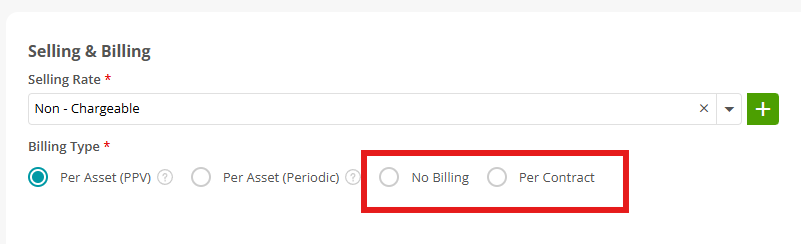
- No-Billing Contracts let you schedule and deliver services as normal without generating invoices, ideal for warranty, pre-paid or inclusive service arrangements.
- PPM quotations now support a fixed Contract Value pricing model alongside Pay Per Visit and Periodic, with no need to fully configure assets at quote stage.
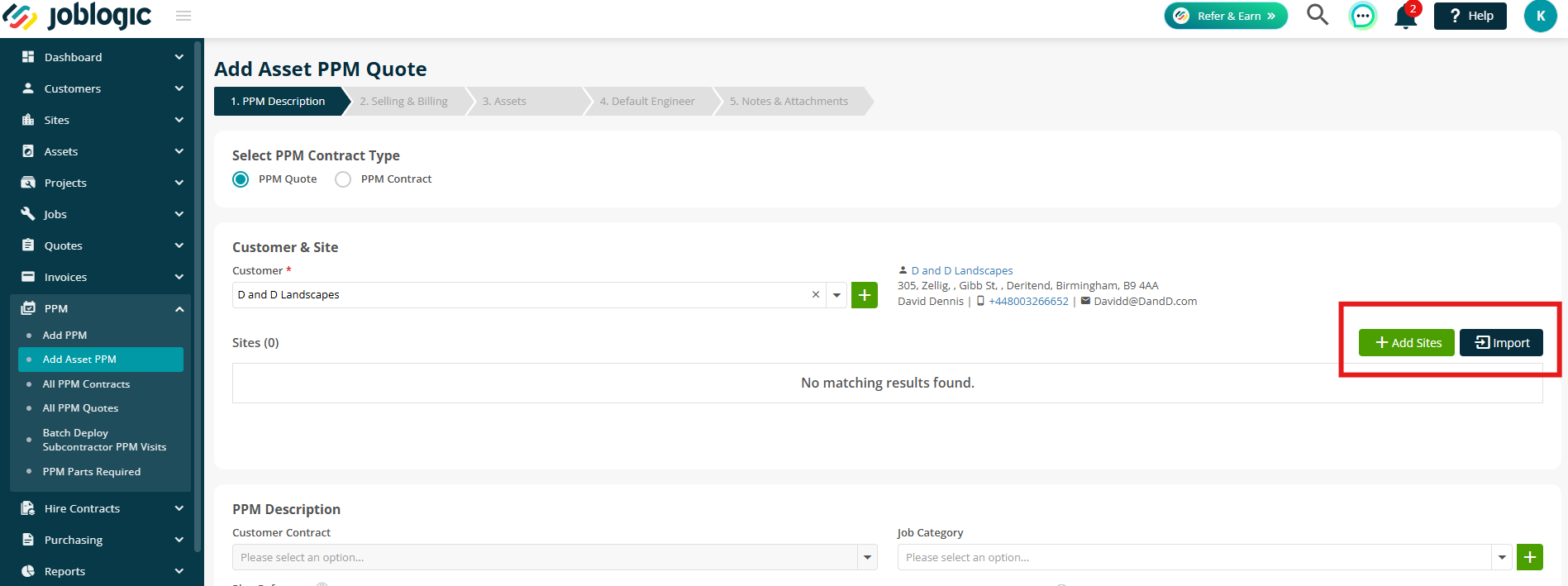
- You can now bulk import sites and assets directly within the contract setup workflow, and configure service schedules as part of the same asset import.
- When assets are added to a contract, service schedules are generated automatically from each asset's maintenance templates and intervals, creating planned work orders, task lists and compliance checks aligned to contract dates and SLAs.
Check out the full user guide here.
4. Microsoft 365 integration improvements
- Multiple Joblogic users can now connect the same shared mailbox in Microsoft 365. Connected users can send emails, search messages, and view the mailbox inbox, with a Shared badge indicating how many users are linked.
- Calendar synchronisation now checks whether a visit has already been synced by another user connected to the same shared mailbox, preventing duplicate calendar events. Individual sync preferences remain configurable for each user.
- When a user unlinks a shared mailbox, it will remain available to other connected users. A confirmation message displays how many users are still linked, and the mailbox is only removed once the final user disconnects it.
Check out the guide here.
5. Supplier & Hire Asset Attributes
- A new Supplier Attribute type allows you to create and manage custom fields against supplier records. A dedicated Attributes tab has been added to supplier details, and supplier attribute tags are now available within guidelines, templates, and purchase order templates.
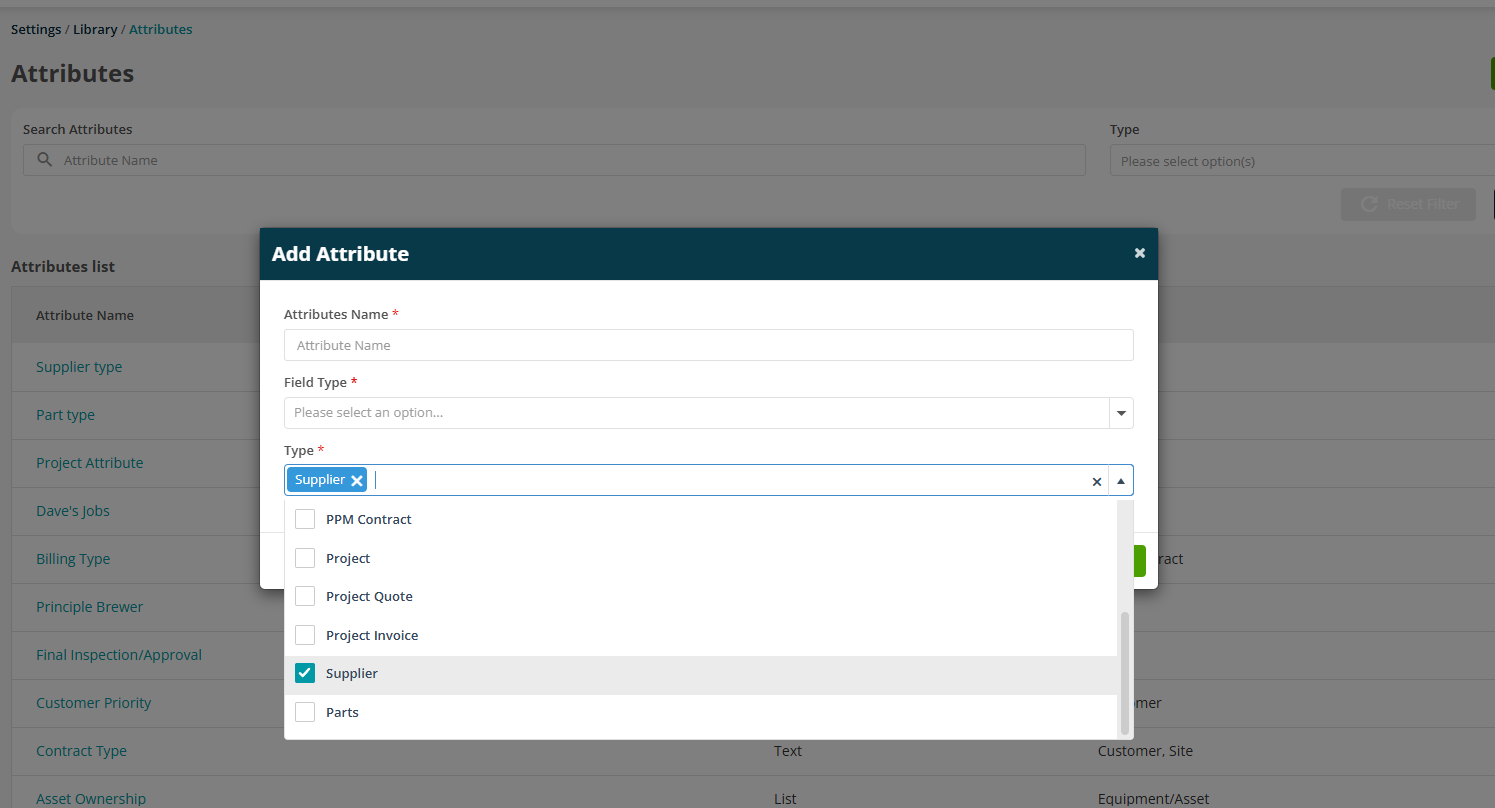
- Asset Attributes are now supported on hire asset records and are shared consistently between standard and hire assets. They are displayed across both Web and Mobile and are retained when assets are assigned to sites or moved between locations.
Click here to read more about Attributes.
6. Advance Reporting
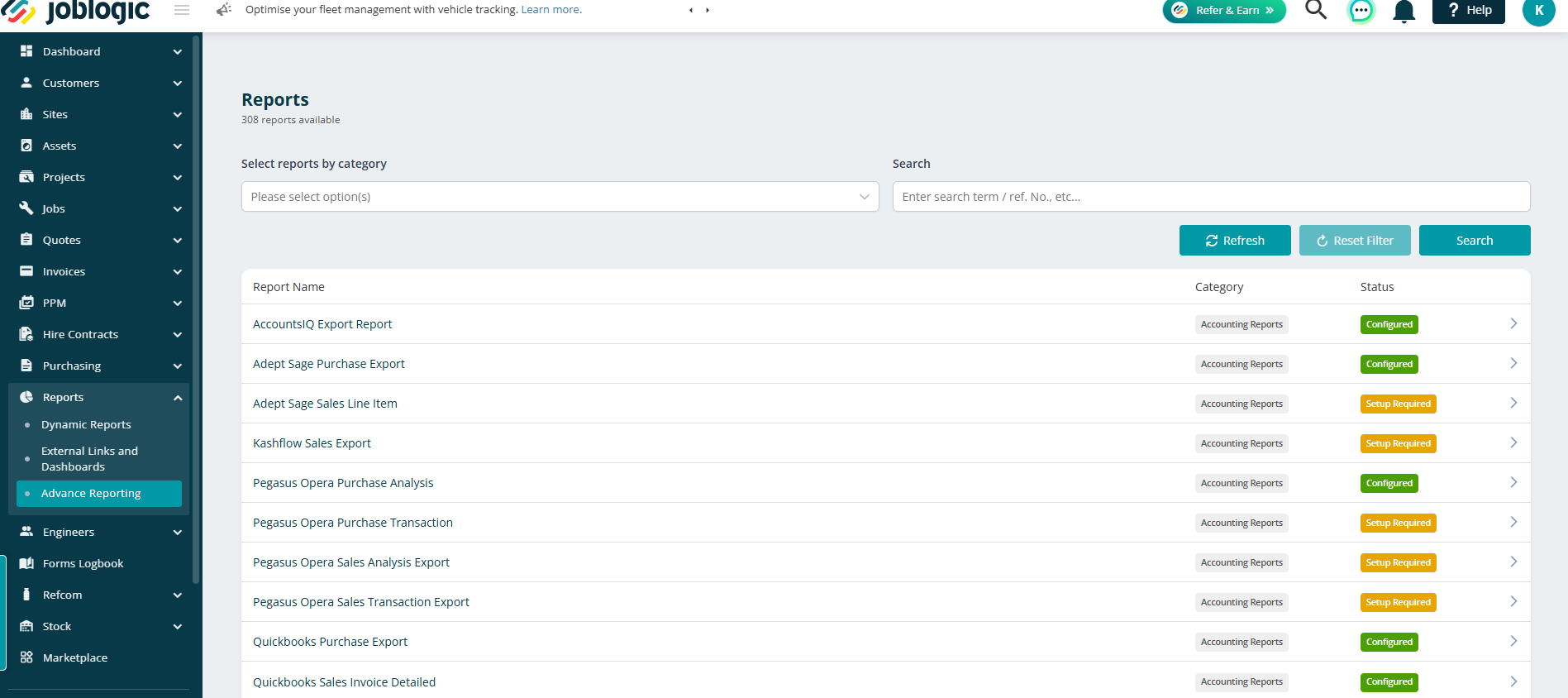
- This exciting new app gives you greater control over how you view, filter and extract your report data, making it easier to turn raw information into actionable insights.
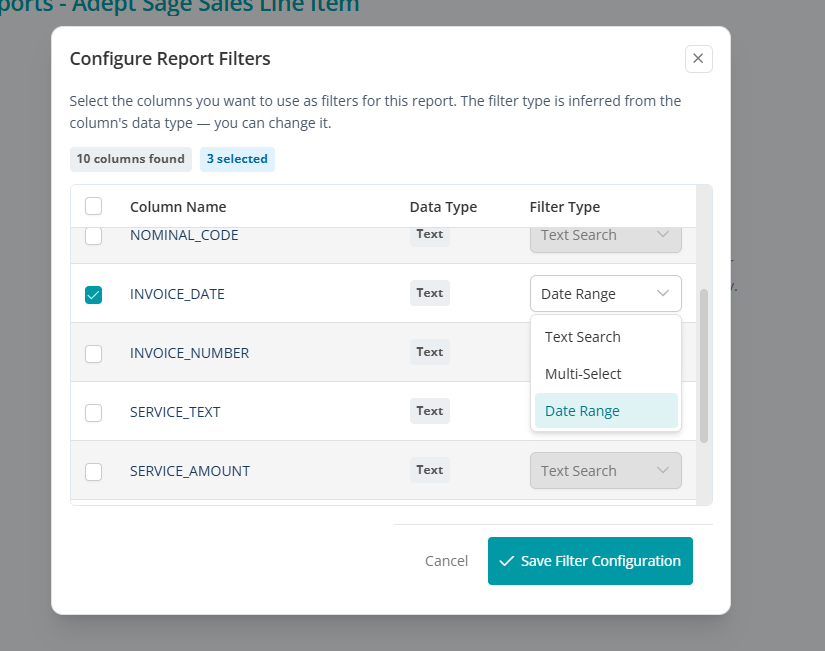
- When subscribed, you can navigate to Reports > Advance Reporting to select a report. Use Generate Filters to choose the fields you want to filter on, then select the appropriate filter type (Text Search, Multi-Select, Number Range, or Date Range). Available options will vary depending on the field selected.
- Saved filters appear at the top of the report page for quick access. You can Reconfigure them at any time or use Reset Configuration to clear all filters.
Click here to read the full guide.
7. Accounts integration support for Hire and Project invoices
- Hire and Project Invoices can now be synchronised with your accounting software, allowing hire-related revenue to flow seamlessly alongside standard sales invoices.
- The functionality works in the same way as existing invoice synchronisation, with Hire and Project Invoices automatically included in the sync process where supported.
- Support is now available for:
- Sage 200
- Sage Intacct
- AccountsIQ
8. Bill of Materials
- We've introduced a brand-new Bill of Materials (BOM) app, allowing businesses to manage in-house assembly using predefined kits of components.
- Create standard assembly kits for buildable parts, including component requirements, quantities, labour time, and labour rates.
- The new workflow helps standardise repeat builds, improve stock control, reduce assembly delays, and provide clearer visibility of build costs.
Check out the guide here for full details.
.png)
.png)
9. Dynamic Scheduler enhancements
- The Dynamic Scheduler now supports Ireland and Switzerland, making it easier to deploy and manage schedules across additional regions.
- New scheduling options have been introduced, including the ability to optimise schedules for selected customers only and a setting to ensure PPM jobs with different preferred dates are not scheduled on the same day.
- Recommendation and optimisation logic has been enhanced to support New Job and Parts to Fit job statuses, while preventing already logged PPM jobs from being included in future optimisation runs.
- Route Planning has been improved with a more intuitive user interface and additional validations to help prevent invalid scheduling scenarios.
Read more about the Dynamic Scheduler app here in this useful guide.
Bug Fixes
- Fixed an issue where certain invoices generated from templates containing asset information could not be downloaded or sent by email.
- Resolved a problem that prevented group invoices from being created.
- Resolved an issue affecting job task lists.
- Resolved an issue affecting subcontractor jobs.
- Fixed an issue where the Account Number and Reference Number in Customer Base Configuration were reset when edited immediately without refreshing the page.
- Resolved an issue where prospect customers were not created when added through the API.
- Fixed an issue where multiple new contacts added while logging a job were not all saved to the job.
- Corrected an issue that prevented a contact number from being added to a job.
- Resolved an issue with the additional-text prompt when sending SMS messages.
- Improved the speed and reliability of search on the customer page.
- Fixed an issue affecting the undeploying of electronic forms.
- Resolved a REFCOM-related issue.
- Updated the Parts API endpoint to support reactivating parts.
- The schemes dropdown is now sorted alphabetically by scheme name.
- Resolved a system access issue that prevented some users from logging in to Joblogic.