Features scheduled for release on 24/09/2026. The functionality detailed will not be available in the system until this date. However, please note that this is an ETA and may be subject to change.
Release Topics
- Bulk Cylinder Return via Export & Import
- PPM Contract View Permission Enforcement
- PPM Asset Invoice - Show Site on Asset Lines - Template Update
- Section-Level Global Discount (Before/After – VAT) for Multi-Section Quotes
- Section-Scoped Sub-Total Tags for Multi-Section Quote Templates
- Extend Job Status Protection to All Automated Flows
- Default Visit Start Time on Planner Month-View Drag-and-Drop
- Visit Cancellation Reason (Capture, Enforce & Manage)
- PPM Invoice with User-Selected Date Raised for Clone Invoice
- Auto-Calculate Invoice Due Date When Invoice Date Changes
- Account Number Update When Invoice Billing Address Changes
Marketplace Enhancements
- SSO Enforcement
- SOR Cost Mapping
- PPM SOR Billing
- Multi Depot enhancements
- Equipment Hire enhancements
- Engineer Shifts Management
- Sage 200 Enhancements
Release Details
1. Bulk Cylinder Return via Export & Import
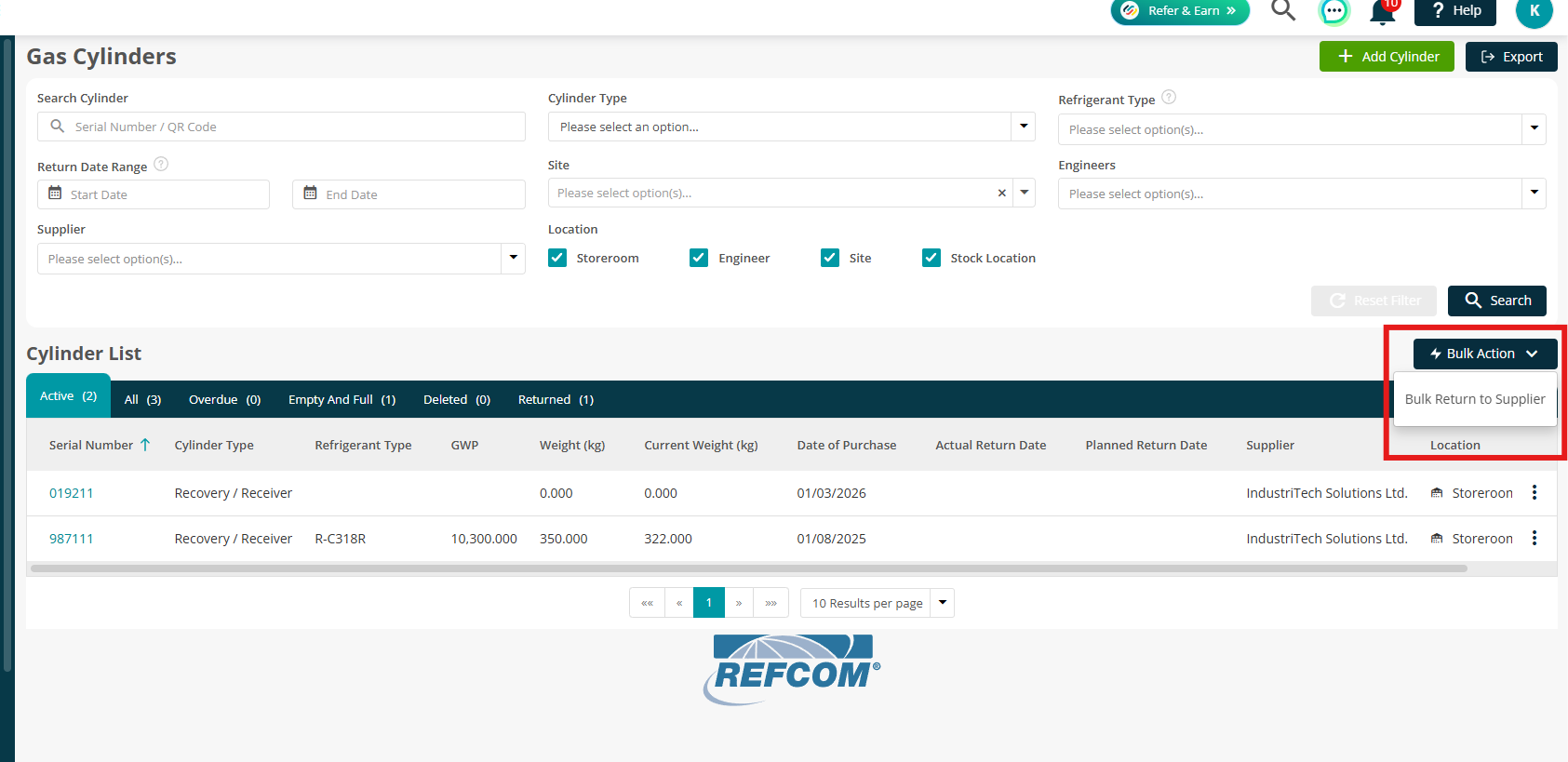
- You can now return multiple cylinders to a supplier in bulk, making it quicker and easier to process cylinder returns.
- Instead of returning cylinders individually, users can now select and process multiple cylinders in a single action. Joblogic validates the entered Serial Numbers and identifies any cylinders that are not eligible for return, helping to reduce errors and ensure accurate records.
- The feature also supports recording the Actual Return Date for each cylinder, with Transfer Notes available for Recovery / Receiver and Waste cylinders.
- This helps reduce administrative effort, improve the accuracy of cylinder records and streamline the process of managing cylinder returns.
Click here to read more in the full guide.
2. PPM Contract View Permission Enforcement
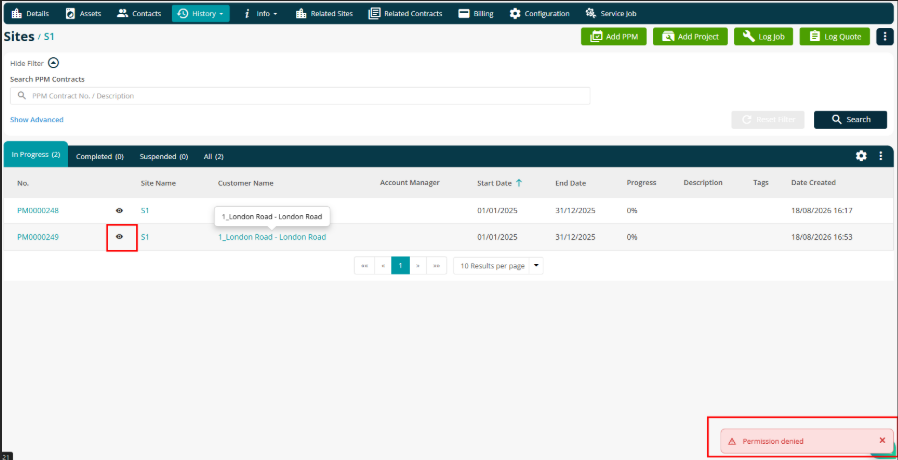
- The PPM Contract View permission is now enforced consistently across the Back Office.
- Users without this permission will no longer be able to view PPM contracts, including contract information accessed through saved or shared links.
- This ensures PPM contract information is only accessible to users with the appropriate permissions.
3. PPM Asset Invoice - Show Site on Asset Lines - Template Update
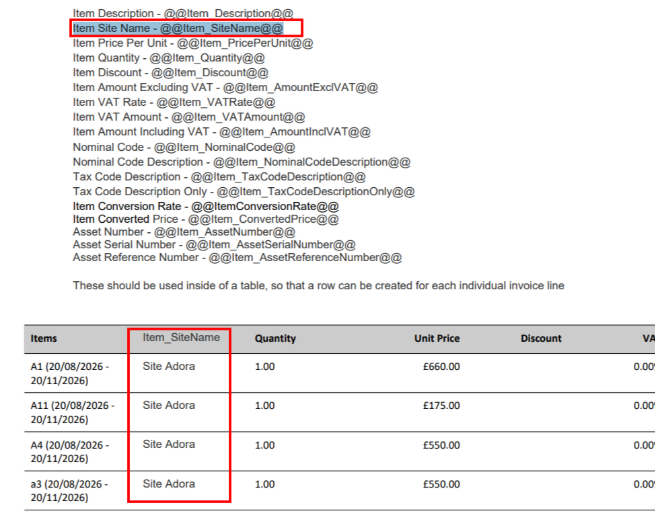
- A new @@Item_SiteName@@ template tag is now available for PPM invoices.
- The tag displays the Site name against each asset line on a per-asset PPM invoice, making it easier to identify which site each asset relates to.
- The new tag is also included in the PPM Invoice template guidelines.
Click here to read more about setting up your templates.
4. Section-Level Global Discount (Before/After – VAT) for Multi-Section Quotes
- Multi-Section and Project Quotes now provide greater flexibility when applying discounts.
- Global discounts can now be applied Before VAT as well as After VAT, and discounts can also be applied to individual quote sections.
- The selected discount method, including the discount level, type, value and VAT basis, is carried through when an accepted quote is converted into an invoice.
- This ensures the Net, VAT, Discount and Grand Total values remain consistent between the quote and invoice.
Check out our handy guide on Multi Section Quotes.
5. Section-Scoped Sub-Total Tags for Multi-Section Quote Templates
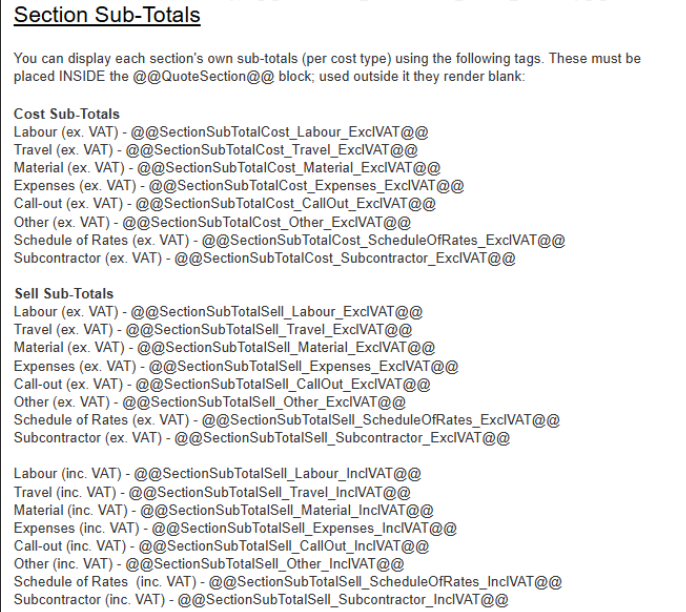
- New section-level sub-total tags are now available for Multi-Section and Project Quote templates.
- These tags can be added within the @@QuoteSection@@ block to display the relevant totals for each individual section, including:
- Labour
- Materials
- Subcontractor
- Call Out
- Other
- Travel
- Expenses
- Schedule of Rates
- Existing whole-quote sub-total tags remain unchanged and can still be used to display overall quote totals.
Click here to read more about setting up your templates.
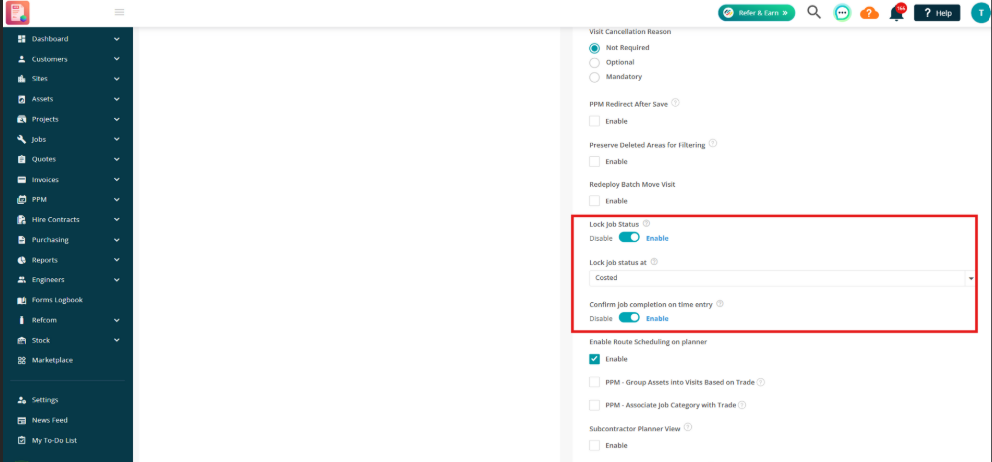
6. Extend Job Status Protection to All Automated Flows
- The Lock Job Status setting now provides protection across a wider range of automated processes.
- Previously called Lock Job Status on Timesheet Entry, the setting now also applies to automated status changes from:
- Mobile visit transitions
- The Subcontractor Portal
- CSV bulk job status imports
- Visit lifecycle processes
- Once a job reaches the selected status, automated processes will no longer change that status. The triggering action will still complete, and the attempted status change is recorded in the Job Status Audit.
- Manual status changes by authorised users remain unaffected.
7. Default Visit Start Time on Planner Month-View Drag-and-Drop
- When dragging a job onto a day in Planner Month View, the new visit will now use the engineer's working hours start time rather than defaulting to midnight.
- Where applicable, the system also considers the linked subcontractor's working hours.
- This helps ensure newly created visits are scheduled at a more appropriate time when using drag-and-drop planning.
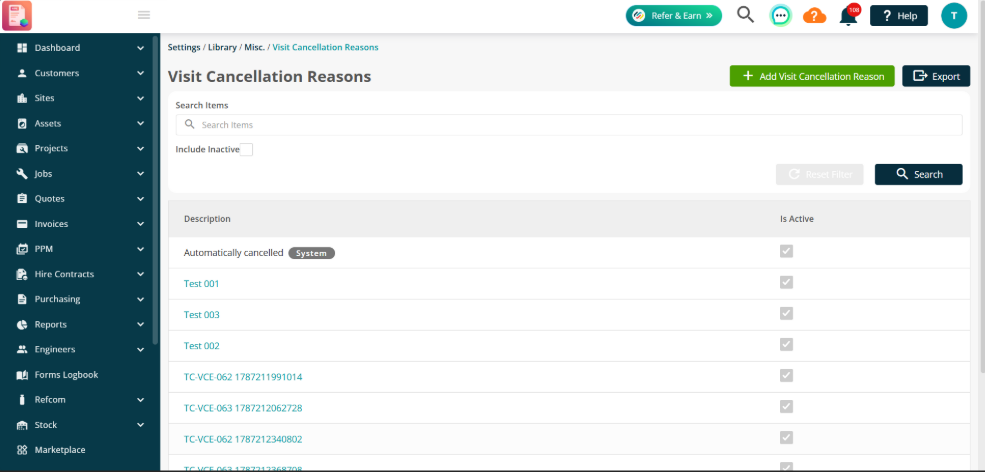
8. Visit Cancellation Reason (Capture, Enforce & Manage)
- A new Visit Cancellation Reasons feature provides greater control and visibility over why visits are cancelled.
- Administrators can configure cancellation reasons as:
- Not Required
- Optional
- Mandatory
- Cancellation reasons can be captured when cancelling visits from the Back Office, with automatic reasons also recorded for certain cascade and API-driven cancellations.
- Users with the appropriate permission can update a cancellation reason from the Visit Status Audit, and cancellation reasons are now available in the Cancelled Visits Report.
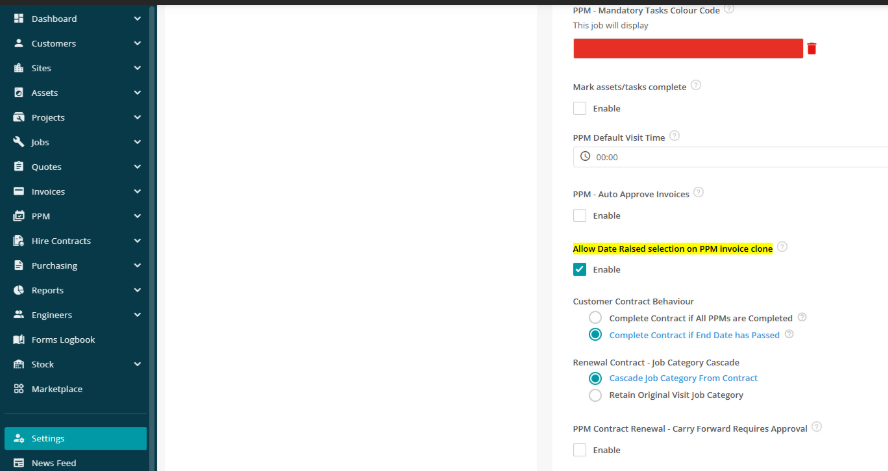
9. PPM Invoice with User-Selected Date Raised for Clone Invoice
- When cloning a PPM invoice, users can now choose the Date Raised for the new invoice.
- This makes it easier to ensure cloned invoices are recorded against the correct billing period.
10. Auto-Calculate Invoice Due Date When Invoice Date Changes
- Changing an invoice's Date Raised now automatically recalculates the Payment Due Date based on the customer's agreed payment terms.
- This applies across Standard, Hire, PPM, Customer-Grouped and Project invoices.
- The customer's payment terms take precedence, while users can still manually override the due date where required.
.png)
(5).png)
Check out the invoice settings guide here.
11. Account Number Update When Invoice Billing Address Changes
- When the billing address on a not-yet-exported invoice or credit note is changed to a different customer or site, the Account Number is now automatically updated to reflect the selected billing address.
.png)
Marketplace Details
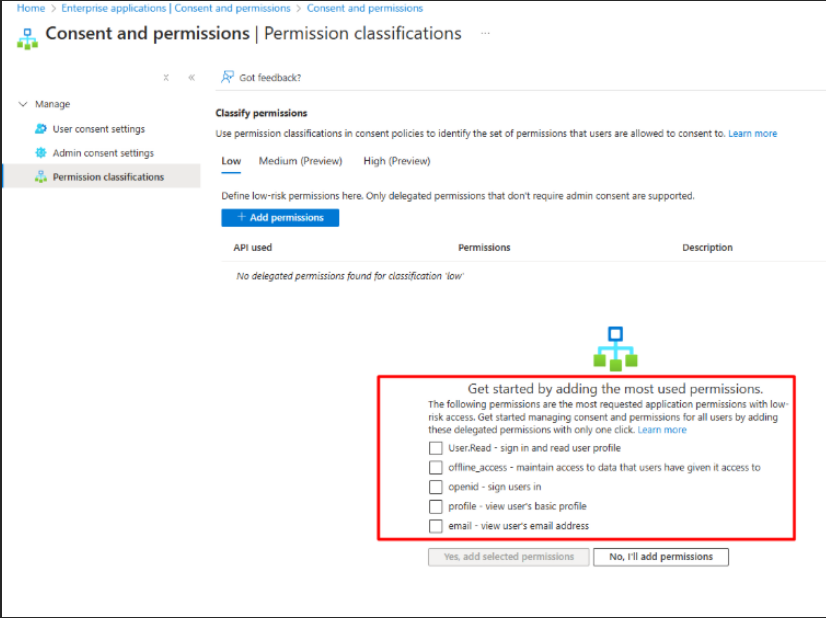
1. SSO Enforcement
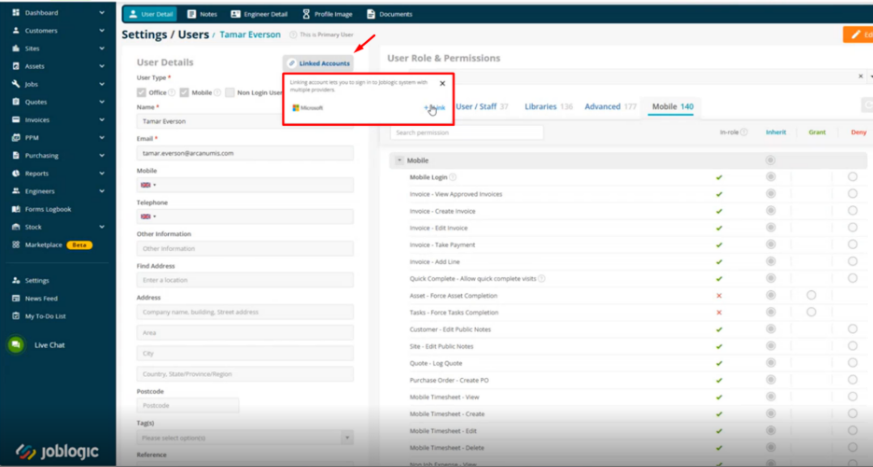
- Customers can now enforce Single Sign-On (SSO) centrally from the Back Office for individual users or entire roles.
- An SSO Status column provides visibility of which users are subject to enforcement, while authorised bypass exceptions can also be identified.
- When SSO is enforced, users sign in using their Microsoft account rather than a Joblogic password. Users who are not subject to SSO enforcement continue to sign in as normal.
- SSO enforcement is applied per company, allowing users who work across multiple companies to select the appropriate company after signing in.
- Engineers can also use the same SSO process when signing in through the Mobile app.
For more information, please see the SSO Enforcement guides.
2. SOR Cost Mapping
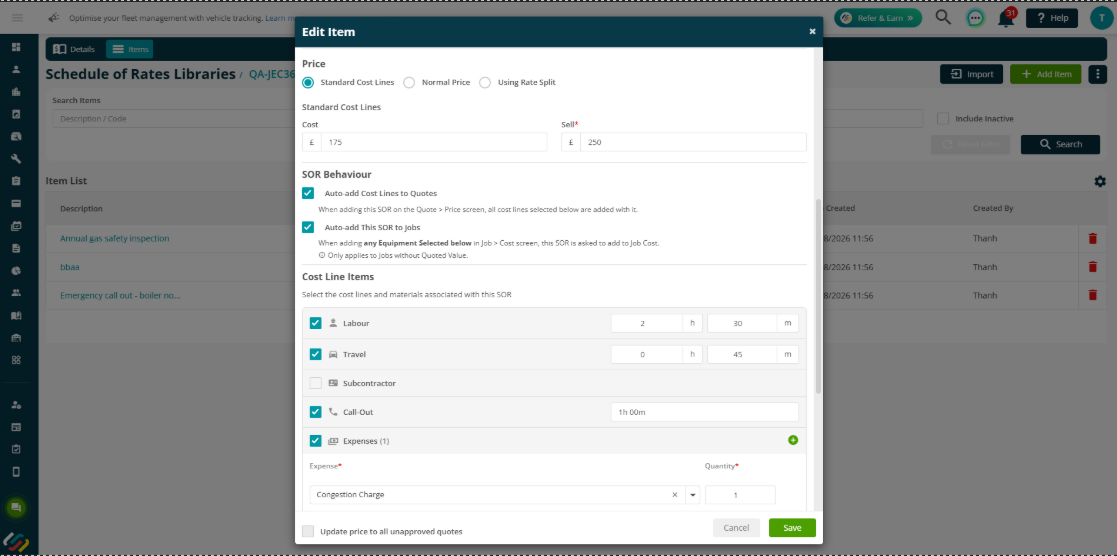
- SOR Cost Mapping introduces a new Standard Cost Lines pricing option for Schedule of Rates items.
- This allows users to define the cost make-up behind a fixed SOR selling price, including Labour, Travel, Subcontractor, Expense, Call Out, Other and Material costs.
- When a Standard Cost Lines SOR item is added to a quote, its configured cost lines can be automatically populated.
- This is available across Reactive and Related Quotes, Quote Templates and Project Quotes.
For more information, please see the SOR Cost Mapping guide.
3. PPM SOR Billing
- PPM Quotes and Contracts can now use Schedule of Rates as a Billing Type, providing dedicated SOR functionality throughout the PPM lifecycle.
- SOR quantities can be automatically calculated from the number of planned visits, while completed and required SOR items can be passed to individual PPM Jobs.
- Previously, Schedule of Rates (SOR) was available in the Mobile App for reactive jobs only. It is now also available for PPM visits, allowing engineers to use SOR when completing planned maintenance work.
For more information, please see the PPM SOR Billing guide!
.png)
.png)
4. Multi Depot enhancements
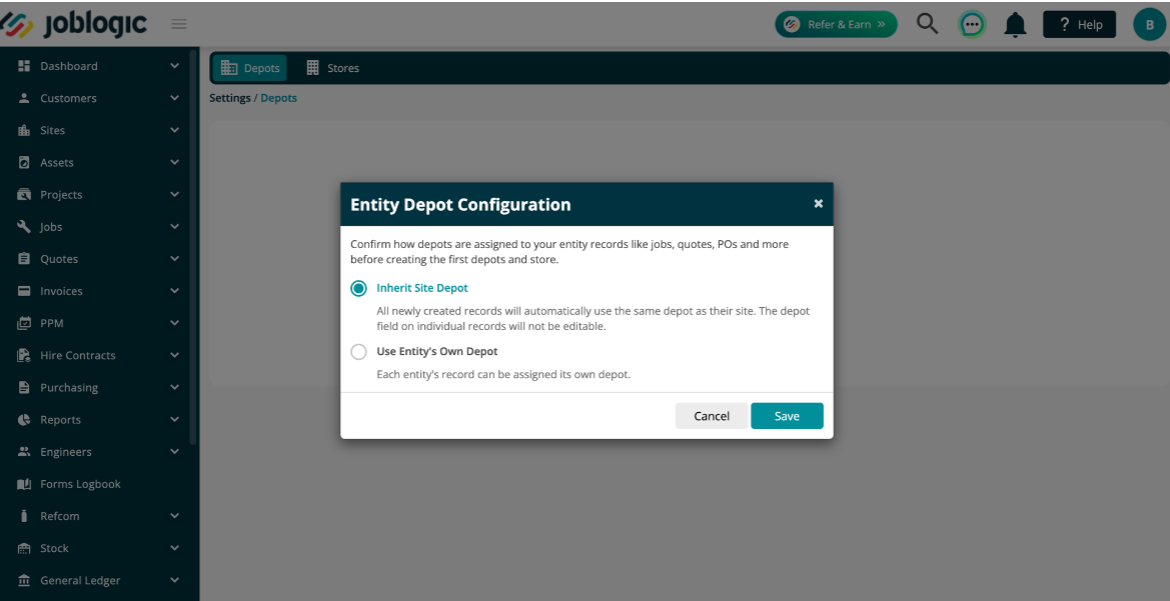
- The Multi Depot app now provides greater flexibility when assigning depots to customers, sites and other entities.
- A new Use Entity's Own Depot option allows entities to have their own depot rather than inheriting one from another level.
- Administrators can also:
- Set default depots.
- Make depot selection mandatory when creating customers and sites.
- Control who can change depot assignments.
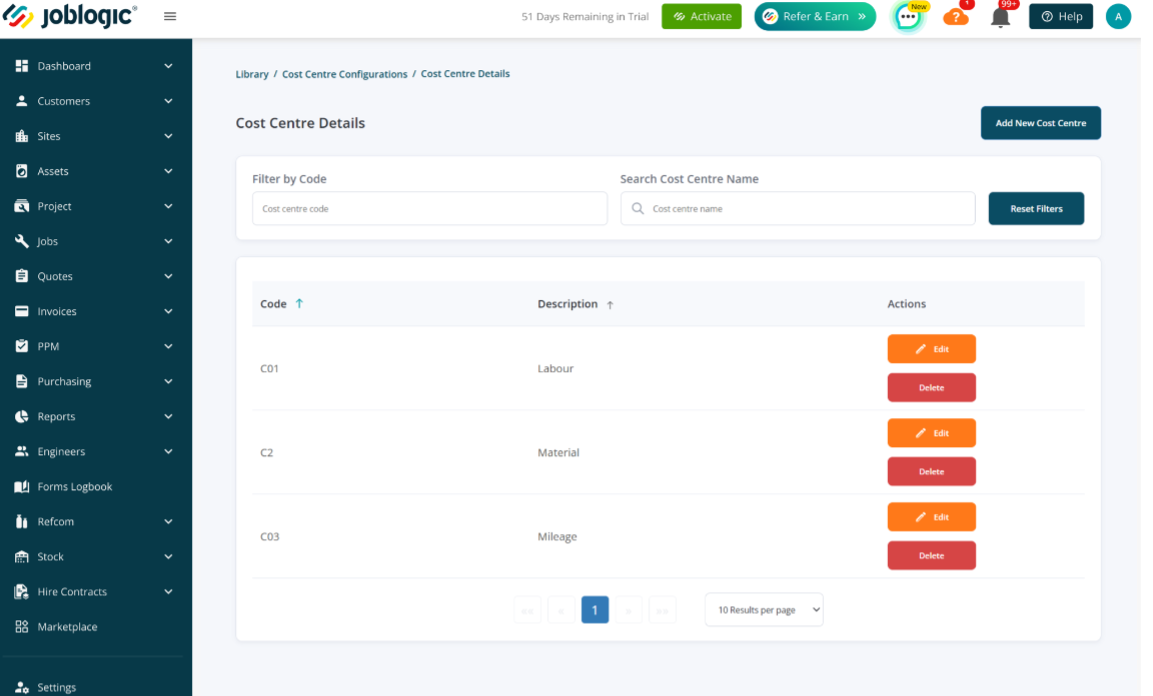
- Create and manage Cost Centres.
- Link depots to Cost Centres.
- Apply inherited depot changes to individual entities or cascade them to related entities.
For more information, please see the Multi Depot guide.
5. Equipment Hire enhancements
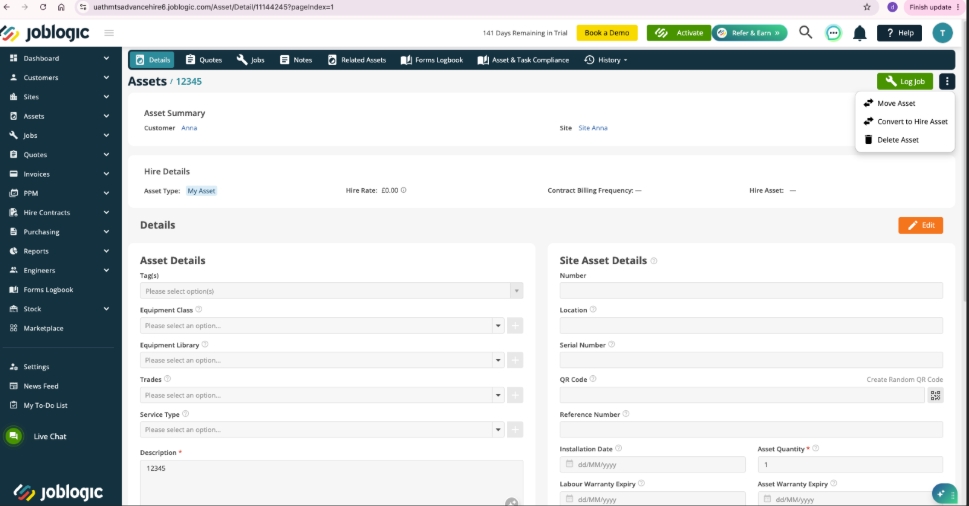
Convert existing assets to Hire Assets
- Standard Assets can now be converted into Hire Assets without needing to recreate the asset.
- Assets can be converted individually or in bulk from the Asset Listing. Before conversion, Joblogic checks for links to active Jobs and Quotes and displays any affected records.
- Existing asset information is retained, including Jobs, Quotes, Contracts, attachments, custom fields, notes, audit history and inspection records. The original Asset ID and creation information are also retained.
- Hire Assets in eligible statuses can also be converted back to standard Assets.
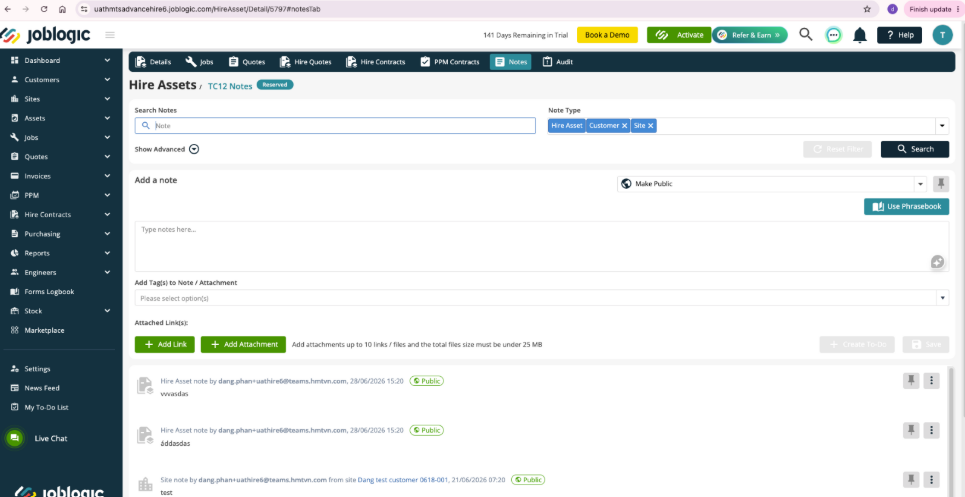
Notes for Hire & Cross-Hire Assets
- Hire Assets and Cross-Hire Assets now have a dedicated Notes tab.
- Users can add, edit, delete, search and filter notes, with support for attachments, links, tags, pinning and to-do creation.
- Engineers can also view and add Hire Asset notes from the Mobile app, with notes synchronised between Mobile and Back Office.
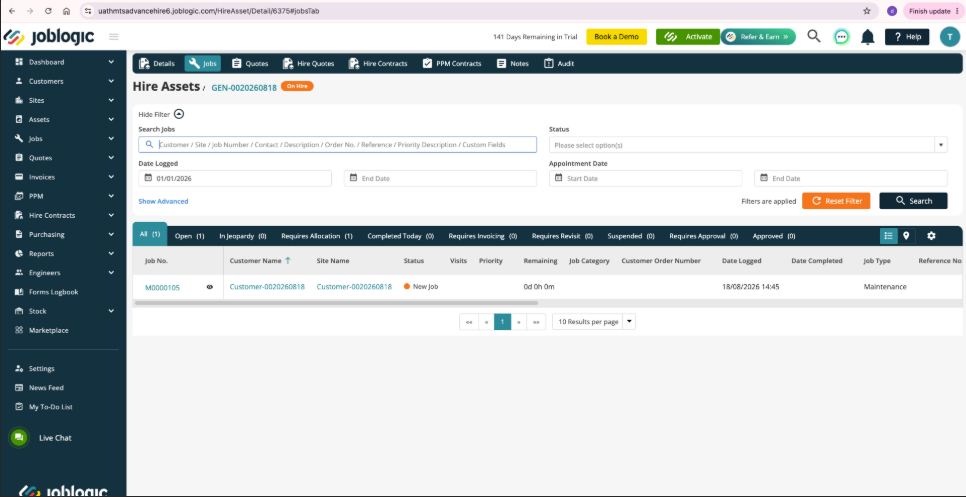
Hire Asset history & association tracking
- Hire Asset details now provide a consolidated view of associated:
- Jobs
- Job and Hire Quotes
- Hire Contracts
- PPM Contracts
- Historical associations remain available even after records have been completed, cancelled or archived.
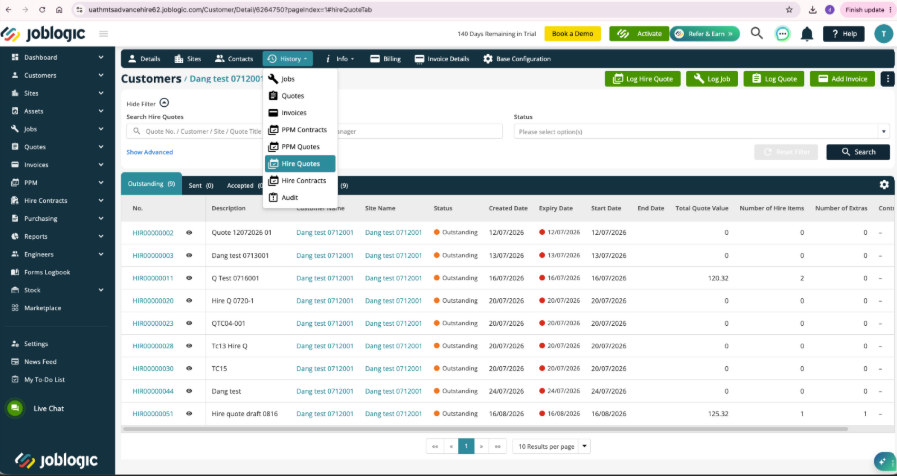
Hire Quotes & Hire Contracts in Customer & Site History
- Hire Quotes and Hire Contracts can now be accessed directly from Customer and Site History, with the records automatically filtered to the relevant customer or site.
Related Hire Assets, Parts & Equipment
- Hire Assets and Cross-Hire Assets can now be linked to related assets, Parts and Equipment through a new Related Items tab.
- When a parent Hire Asset is added to a Hire Quote, Hire Contract or Job, eligible related items can also be carried across into the transaction.
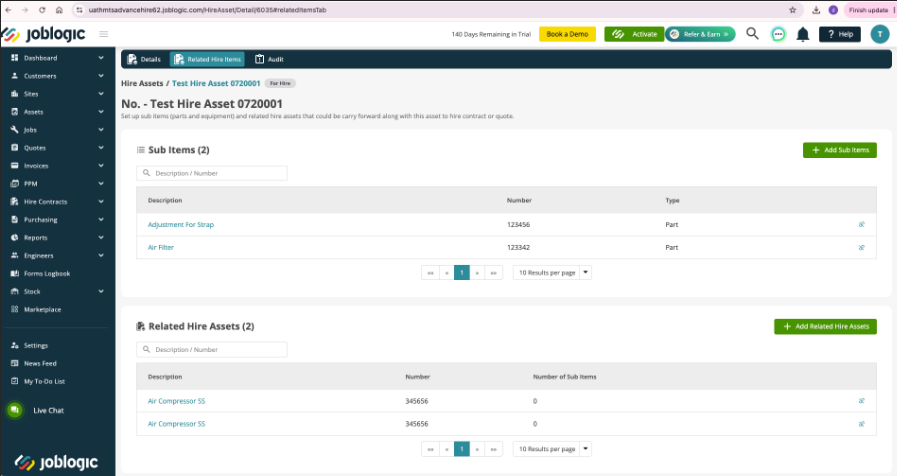
For more information on these changes, please see the Equipment Hire guide.
6. Engineer Shifts Management
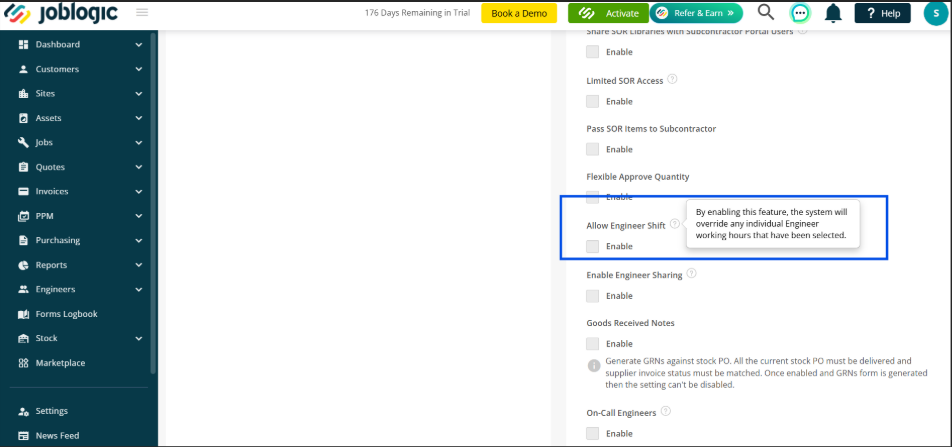
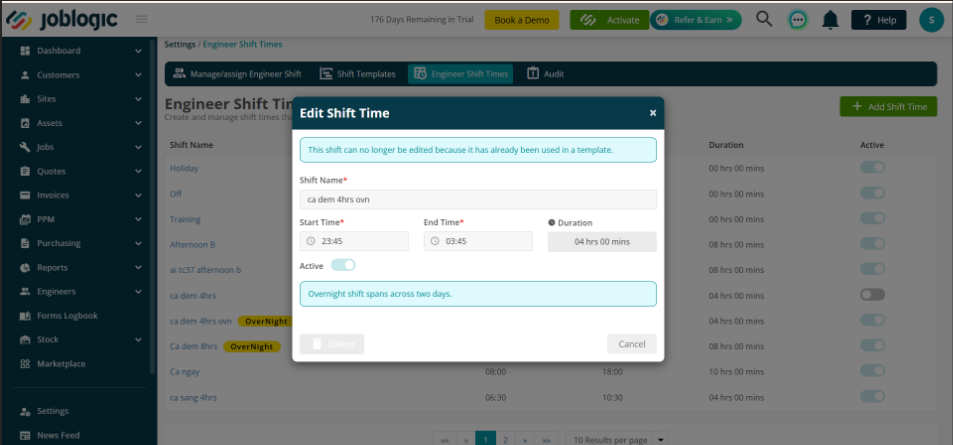
- Engineer Shifts is now available as a Marketplace App, providing a reusable solution for managing more complex engineer shift patterns and workforce rotas.
- The enhanced functionality supports advanced shift templates, including longer and repeating rota cycles and overnight shifts. Engineers can also be assigned to the appropriate point within a rota, making it easier to onboard engineers part-way through an existing shift cycle without manually adjusting their schedules.
- Additional controls and visibility have been introduced to help planners manage shift assignments, backdated shifts, Non-Productive Time (NPT) and overlapping shifts more effectively.
- These enhancements help you manage complex workforce schedules with greater accuracy, reduce manual administration and give planners better visibility of engineer shift assignments.
Click here to read the full guide.
7. Sage 200 Enhancements
- The Sage 200 Standard Integration has been enhanced to support improved synchronisation of customers, suppliers, invoices and payments between Joblogic and Sage 200.
- Customer and supplier records created in Sage 200 with an On Hold account status and Hidden enabled will not be synchronised to Joblogic.
- Subcontractors can be created as suppliers in Sage 200 to support the synchronisation of Subcontractor and Contract purchase invoices.
- Additional invoice synchronisation handling has been introduced to support sales and purchase invoice processing through Sage 200.
- The integration continues to provide synchronisation history, allowing you to review successful and failed synchronisation activity.
Click here to read the full guide.
Bug Fixes
- Fixed an issue where asset notes and attachments could be lost when moving an asset to a different Customer or Site. Existing notes and files are now retained.
- Fixed an issue where System Setup could overwrite a stored lock status when a null value was received. The existing value is now preserved.
- Fixed an issue where the Confirm Job Completion on Time Entry setting was read-only for all users. The required permission is now assigned to the Administrator role.
- Fixed an issue where visit status transitions on Mobile could occur on frozen jobs. Freeze protection is now applied consistently.
- Fixed an issue where Jobsheets were not attached to batch invoice emails. The system now correctly follows the Attach Jobsheet setting configured in the Invoice Email Template.
- Fixed an issue in the Form Log Book where records without an assigned depot were incorrectly displayed when filtering by a specific depot. The filter now correctly shows only records belonging to the selected depot.